Manga vs Light Novel: What's the Difference?
By PageTranslate Team · · 7 min read
Manga vs light novel comes down to the medium. Manga is a Japanese comic told in drawn panels, and a light novel is a Japanese prose novel with a few illustrations.
That one difference decides how you read them. And it decides whether software can help you translate one, because a light novel is text and a manga page is a picture that happens to contain text. I tested both kinds of file in PageTranslate on October 2, and both failed the first time. Both were bugs on our side, since fixed.
EPUB, PDF or Word, same format back. Exact price before you pay.
What manga is
Manga are Japanese comics. Chapters run in magazines or on websites first, and the popular ones get collected into volumes called tankobon. The words sit inside the art as speech balloons and hand-lettered sound effects.
Japanese editions read from right to left. Most English editions keep that order, although some flip the pages to read left to right (Wikipedia notes both). Magazines carry audience labels such as shonen for boys and seinen for adult men, but manga as a whole covers every age and genre, and plenty of readers ignore the labels.
What a light novel is
A light novel is prose. Anime News Network's 2016 explainer puts a typical volume at about 300 pages with manga-style illustrations, although some have none. It also says the term is "usually" credited to Keita Kamikita in 1990, and that the form is defined by branding and marketing more than by style.
The word "light" points at easy reading. Japan's foreign ministry magazine, Web Japan, described them in 2007 as dialogue-heavy and plot-light, aimed at teens and people in their twenties. They were cheap paperbacks. It added that the category has "no firm definition". Fair enough.
Many begin online. Shosetsuka ni Naro (Syosetu), whose front page claims more than 1.3 million works, and Kakuyomu both let anyone post a serial, and publishers pick up the ones that catch on.
One more detail, because it matters for translation. Japanese prose often prints tiny kana readings beside the kanji, called ruby or furigana, and W3C's Japanese layout note treats the two words as near synonyms. I suspect light novels for younger readers use it a lot, but I couldn't find a source that says so, so take that as a guess.
Manga vs light novel, side by side
| Manga | Light novel | |
|---|---|---|
| Medium | Drawn panels with lettering | Prose with a few illustrations |
| Typical volume | A tankobon of serialized chapters | About 300 pages in a small paperback, per ANN |
| Illustration | On every page | A handful of inserts, sometimes none |
| Where the words live in the file | Inside the picture | As real text |
| Common routes in | Magazine or web serial | Publisher prizes, plus web novel sites |
| Machine translation of the file | Needs the lettering read, redrawn and fitted first | Yes, as a first draft you then edit |
Which one to read first
My bias is to start with manga, because a single volume tells you within an hour whether the story and the art suit you. That is only an opinion, and plenty of readers would start with the novel.
The same story often exists in both forms. Yen Press lists Sword Art Online as a light novel (29 main volumes under its Yen On imprint at the time of writing) and, separately, a manga adaptation by Koutarou Yamada in 10 volumes. An adaptation is its own work, so scenes can be cut or moved.
Official English editions come from VIZ and Kodansha USA for manga and from Yen Press and J-Novel Club for novels, with Seven Seas another name to check. Ownership shifts. Media Do bought Seven Seas in March 2026, and Yen Press and J-Novel Club sit under Kadokawa's group, so find out who holds a series before you assume a free site has permission. Scanlation sites copy and translate pages without it. I won't link to any.
How translating them differs
A light novel arrives as an ebook, which is text, and text can be translated as a file. A manga page is an image of lettering. A tool that translates text has nothing to read until something has first recognized the pictured words, redrawn the balloon and fitted the new wording in.
PageTranslate is built for the text in documents, and it is not a manga translator. I wanted to see what that means in practice, so I uploaded a 12-page manga sample EPUB (the right-to-left Haruko sample from the IDPF's EPUB 3 set). The service found lettering in pictures and tried to translate it, and the first attempt failed after about four minutes with "Translated image text cannot fit inside its source region". The cause was plain. Manga lettering sits in narrow vertical columns, and an English line is too wide for a column at any size.
We fixed that. English now wraps, and the columns of one balloon are set as one block. The same sample then came back as an EPUB with English lettering on all 12 pages, again in about four minutes, and EPUBCheck found no errors in it. It is a rough draft, a long way from a finished page. In my run, scraps of the original strokes were left under the English in places, busy artwork picked up soft grey patches where the old lettering was removed, a sentence split across two columns came out as the single word "Installed", and tight balloons got small type. Nobody should ship it as it stands. I'm not showing any of its pages, because the sample's file doesn't declare a licence.
Professionals are split on the wider question. Mantra says AI drafts the text on its platform and native translators review every line (its own press release, 2026-09-16). When Media Do bought Seven Seas, it said it had "absolutely no plans" to use AI translation there, according to Anime News Network.
Translating a light novel: a practical workflow
The text below is a real run on a public-domain Japanese novel, with everything that went wrong left in. (As of October 2, 2026. Software changes.)
-
Check the rights. Natsume Soseki published Kusamakura in 1906 and died in 1916. Japan's term is the author's life plus 70 years, in force since December 30, 2018 and never applied backwards, so his protection ended decades ago. In the US, works published before 1931 are public domain. Aozora Bunko's terms allow copying and converting its files. A modern English translation is a separate work. The public domain short stories guide explains how to check one.
-
Start from a clean file. I used the Kusamakura sample in the IDPF's EPUB 3 set, which packages Aozora Bunko's text. I cut chapter one (about 7,000 characters, with 394 ruby readings) into its own EPUB, and EPUBCheck 5.4.0 found no errors in it. If your book has DRM, stop there. I won't help remove it, and neither will PageTranslate.
-
Run it. The first attempt, with the readings in place, failed in 13 seconds with "LLM response contains an empty translation". A second identical try failed in 25 seconds. The service had quoted 1,598 words for a chapter, and its log explained why. Each reading, such as やまみち above the word for mountain path, went in as a separate piece of text, and one came back blank. That was a bug in how we read EPUBs, and it is fixed. Readings are now dropped before translation, and each sentence goes in as one piece. Run again, the same file finished in 44 seconds, was quoted at 516 words (the same as the chapter with the readings stripped out by hand) and passed EPUBCheck with no errors.
-
Read it against the original. The opening lines are fluent. The first sentence came back as "As I climbed the mountain path, I pondered thus."
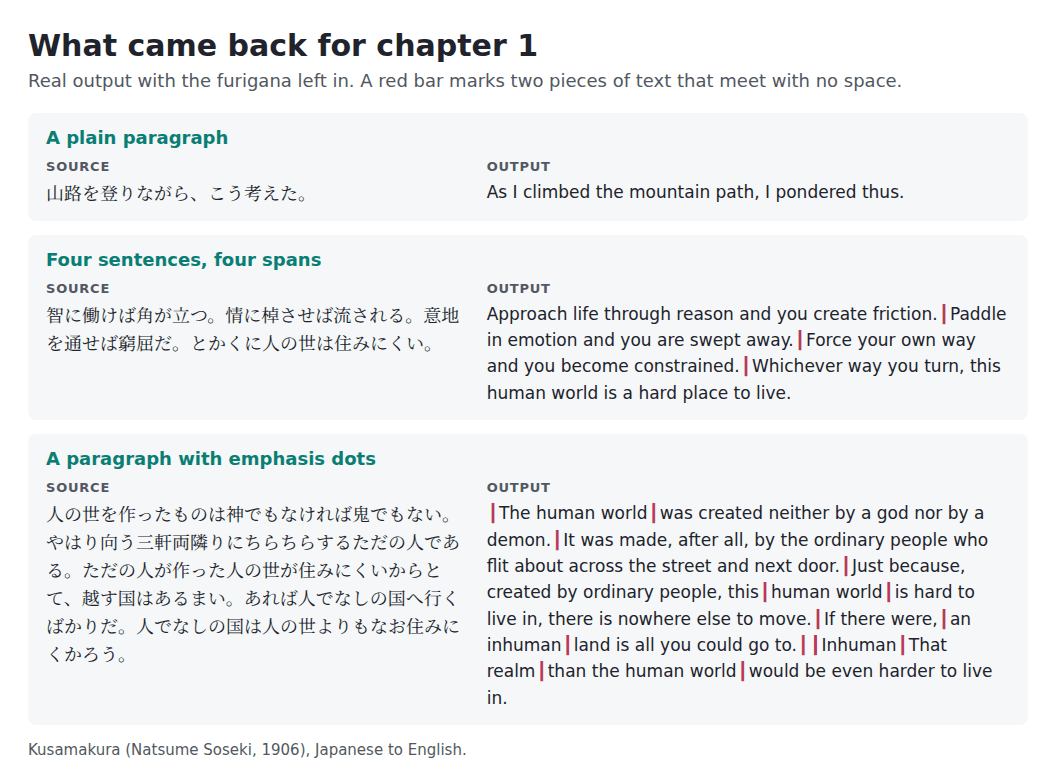
Real output from the Kusamakura run. Red bars mark text that meets with no space.
That is where the trouble starts. The source puts each sentence in its own tag with no whitespace between them, and the English came back the same way, so "friction.Paddle in emotion" and "The human worldwas created" are in the file. Where Soseki marks words with emphasis dots, the pieces were translated separately, and the last sentence of that paragraph came back stitched together as "Inhuman That realm than the human world would be even harder to live in". The meaning is right and the sentence isn't. An earlier run of the same chapter reversed the meaning, so I'd read these passages twice. Check emphasis marks and sentence joins in any book you do this with.
The file also kept the original vertical-writing stylesheet while its metadata says English and left to right. I didn't confirm how a reader would show that..
- Edit it. Fix the spacing and repair sentences like the one above. Check names yourself too, since there is no glossary upload. The post-editing guide covers the pass, and how to edit EPUB files covers the file. Then see EPUB or MOBI for Kindle before you publish.
For pricing, the cost FAQ explains the quote, and the EPUB translator page covers the format. The purpose of translation and translation strategies posts help you decide how loose or literal a novel should be. A longer walk-through of the Kindle side is in the Kindle translation guide.