DOCX Translator
Upload a DOCX and translate its main text while preserving paragraph order, bold text, and italics. The result is an editable DOCX.
Drop your DOCX to get the exact price
Upload up to 100 MB. The main document body stays editable.
Drop your file here
or click to browse your computer
No account needed for a quote. No subscription needed to order.
- Maximum file size
- 100 MB
- Free words after email check
- 3,000
- Re-run or refund on eligible jobs
- 7 days
- Price shown before payment
- Exact
Real files, real output
See a translated Word document
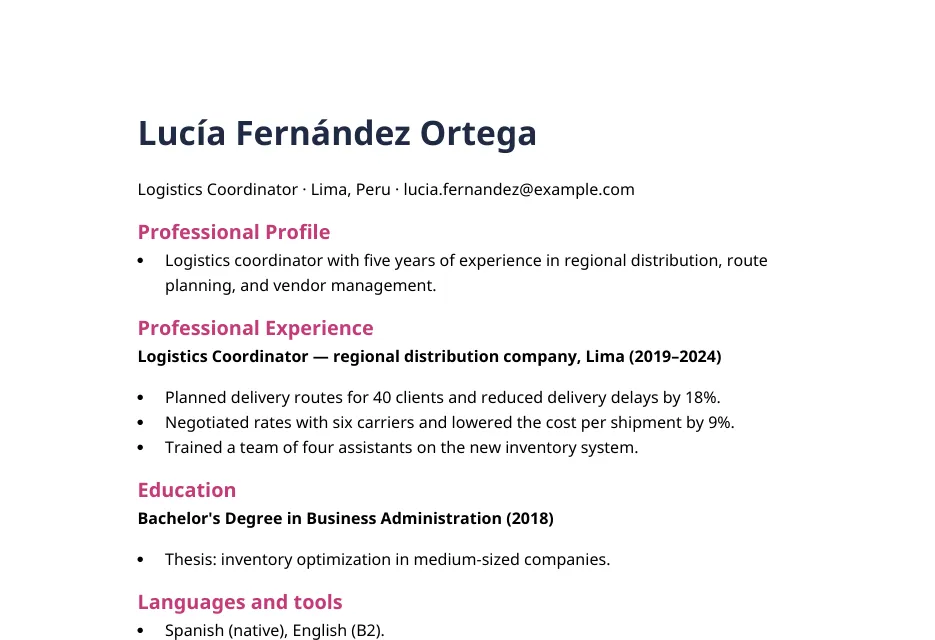
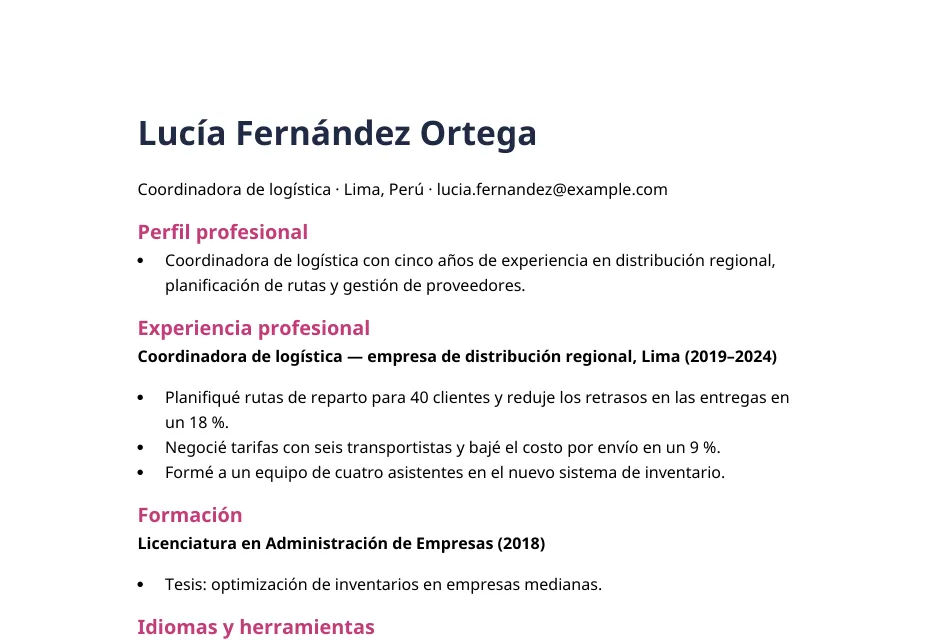
A real DOCX file before and after translation. Drag the handle to compare.
A Spanish CV, returned as an editable Word file
- Heading colors, bold job titles and bullet lists are unchanged
- Dates, percentages and the email address come through exactly
- The download is a .docx you can keep editing
Fictional CV written for this demo. Unedited output from the local pipeline, September 2026, rendered in LibreOffice.
What goes wrong with text-only translation
Why text-only DOCX translation requires you to rebuild the file
A list of translated paragraphs does not include the Word document structure. You still have to restore the paragraph order and formatting.
Copy and paste separates text from Word formatting
Text copied into a chat window is no longer tied to its paragraph order, bold text, or italics.
Each translated paragraph must be placed back by hand
You must match each translated block to the correct paragraph and restore its formatting.
Editors need an editable DOCX
A plain-text translation must be rebuilt before an editor can review it in Word.
What you get back
Translate DOCX files while preserving paragraph order, bold text, and italics
The translated text is placed back into the main document body. The output is a DOCX you can continue editing.
Chapter Two
The Lighthouse Keeper
Mara had kept the light for eleven winters, and in all that time she had never once seen a ship come in after dark.
The logbook said otherwise. On the night of the storm, someone had written a single line in handwriting that was not hers.
She read it twice, then closed the book and climbed the stairs.
Chapitre deux
La gardienne du phare
Mara gardait le phare depuis onze hivers, et pendant tout ce temps, elle n’avait jamais vu un navire accoster après la tombée de la nuit.
Le journal de bord disait le contraire. La nuit de la tempête, quelqu’un avait écrit une seule ligne, d’une écriture qui n’était pas la sienne.
Elle la relut deux fois, puis referma le registre et monta l’escalier.
Paragraph order is preserved
Translated text is placed back into the same main-body paragraphs in the DOCX.
Bold text and italics are preserved
Translated text is placed back into the Word runs that hold bold and italic styles.
Output: editable DOCX
Open the translated DOCX in Word or another DOCX editor and continue editing it.
What happens to your file
What happens to your DOCX
Real output from our translation engine, from idioms and names to scanned pages and embedded fonts.
Meaning, not word for word
Text is translated in passages, so idioms read the way a person would write them.
智に働けば角が立つ。
Work with wisdom and corners stand up.
Approach life through reason and you sharpen your edges.
日本語 → EnglishNames stay the same
Character, place and product names are kept as written from the first chapter to the last. Real output from Pride and Prejudice:
“My dear Mr. Bennet,” said his lady to him one day, “have you heard that Netherfield Park is let at last?”
« Mon cher M. Bennet, lui dit un jour son épouse, avez-vous appris que Netherfield Park est enfin loué ? »
The layout stays put
Headings, columns, figures and page breaks keep their place. You get a translated file, not a text dump.
OCR for scanned pages
Scanned and photographed pages in English, French, German, Italian, Portuguese and Spanish are read before translation.
OCR: “DRINK ME”
«BÉBEME»
The right font for every script
Translated PDFs embed bundled open-source Noto fonts, so Khmer, Arabic or Thai text shows up on devices without those fonts.
ខ្មែរ
Noto Sans Khmer
العربية
Noto Sans Arabic
हिन्दी
Noto Sans Devanagari
ไทย
Noto Sans Thai
עברית
Noto Sans Hebrew
ქართული
Noto Sans Georgian
বাংলা
Noto Sans Bengali
தமிழ்
Noto Sans Tamil
The exact price first
Every line of the quote, calculated from your file, before you pay.
Your quote
novel.epub · 80,000 words
Total—
Shown before payment · Guest checkout
Three steps
From upload to translated DOCX
- 01
Upload once
Drop in a DOCX up to 100 MB. We check the file and count the words.
- 02
Choose the language
Pick the new language and see the exact price before checkout.
- 03
Download the translated DOCX
Download the translated DOCX and start reading or reviewing it.
Use a Word document translator for manuscripts, reports, and client review
Manuscripts and long-form drafts
Keep chapters and paragraphs in order so your editor can start in Word instead of rebuilding the file.
Reports and internal documents
Translate the main text for coworkers in another language while keeping the file open for normal edits.
Client review copies
Send an editable draft that a reviewer can mark up instead of a set of loose text blocks.
Less risk before checkout
Know the cost before you commit
You should not have to buy the full translation just to test the price or result.
- See the word count and exact price before you pay
- Start as a guest without creating an account
- Get 3,000 starter words when you verify a free account
- Ask for a re-run or refund within 7 days on jobs of 50,000 words or less
70 languages, 9 file types
The source language is detected for you. Pick the target at checkout, and get your file back in the format you uploaded.
70 target languages
From Spanish, German and Portuguese to Japanese, Arabic, Swahili and Khmer.
More Word document translation
Translate a CV, compare the ways to translate a Word file, or browse document translation by language.
- CV TranslatorTranslate your CV or resume and get an editable Word file back to check and adjust.
- How to Translate Word DocumentThree ways to translate a Word file, and when each one keeps your formatting.
- Document Translation SoftwareSelf-service translation for PDF, Word and EPUB files, with an exact quote before you pay.
- Translate Document from English to PortuguesePortuguese is preselected, with Brazilian Portuguese available in the same selector.
Before you upload
DOCX Translation FAQ
Will the translated DOCX still be editable?
Yes. The result is still a Word document. You can edit it in Microsoft Word, LibreOffice, or another app that opens DOCX files.
Which formatting is preserved?
The main text keeps its paragraph order. Bold and italic styles stay with the text they belong to. Always review the file before publishing it.
What about tables, text boxes, headers, footers, comments, and tracked changes?
Do not count on those items being translated or saved. The current DOCX process focuses on the main document text. Accept or reject tracked changes, keep a backup, and check files that use advanced Word features.
Is text inside images translated in a DOCX?
Supported raster images are checked with OCR in the background. Words found inside those images are translated in place while the image stays in the DOCX. Review small, stylized, handwritten, or low-contrast text before sharing the file.
Can I download a bilingual DOCX with both languages?
No. The current output replaces the main source text with the translated text. Keep the original DOCX if you need to compare both versions. Side-by-side bilingual formatting is not available.
How large can my DOCX be?
DOCX uploads can be up to 100 MB. If the document contains supported images, OCR runs in the background before the exact word count and price appear.
Which languages can I translate a DOCX into?
You can choose from more than 50 target languages, including Spanish, French, German, Chinese, Japanese, Korean, and Arabic. The language selector shows the current list before translation.
How much does a DOCX translation cost?
The price is based on word count in 1,000-word blocks. Upload the file to see the exact price before you pay.
Do I need an account or subscription?
No. You can upload and get a price as a guest. A verified free account gives you 3,000 starter words.
Should I review the translated Word document?
Yes. Review names, technical terms, numbers, and any wording where tone matters. Also check tables and advanced Word features because the current translator focuses on the main document text.
Who owns the translated DOCX?
You keep ownership of your source file and translated output. PageTranslate does not claim rights to either file. You are responsible for having permission to translate, share, or publish the original content.
How is my uploaded DOCX protected?
Uploads are encrypted while they move and while they are stored. Access is restricted through application and administrative controls. Review the Privacy and Security pages before uploading private files.
Translate a DOCX and download an editable translated DOCX
Paragraph order, bold text, and italics are preserved in the main document body. You see the exact price before checkout.
Upload your DOCX for an exact quoteJobs of 50,000 words or less come with a 7-day re-run or refund guarantee.