Google Translate English to Spanish Documents
On a computer, open Google Translate, click Documents, choose English to Spanish, upload a file under 10 MB and click Download translation. Both Google methods are below, plus an upload for files Google can't translate.
Google Translate didn't work?
Over 10 MB, scanned, an EPUB or on your phone? Upload the English file here. Spanish is preselected.
Drop your file here
or click to browse your computer
Spanish is preselected at checkout. You can change it. No account needed for a quote.
In Google Translate
Best for: Word, PDF, PowerPoint or Excel files under 10 MB
- 1Open translate.google.com on a computer and click Documents
- 2Set English on the left and Spanish on the right
- 3Click Browse your computer and pick the file
- 4Click Translate, then Download translation
In Google Docs
Best for: Documents already in Google Drive
- 1Open the document in Google Docs (convert Word files to Google Docs first)
- 2Click Tools, then Translate document
- 3Name the copy and choose Spanish
- 4Click Translate. The Spanish copy opens and is saved to Drive
- Per file, PDFs up to 1,000 pages
- 100 MB
- Price shown before payment
- Exact
- Free words with a verified account
- 3,000
- Re-run or refund on eligible jobs
- 7 days
Real files, real output
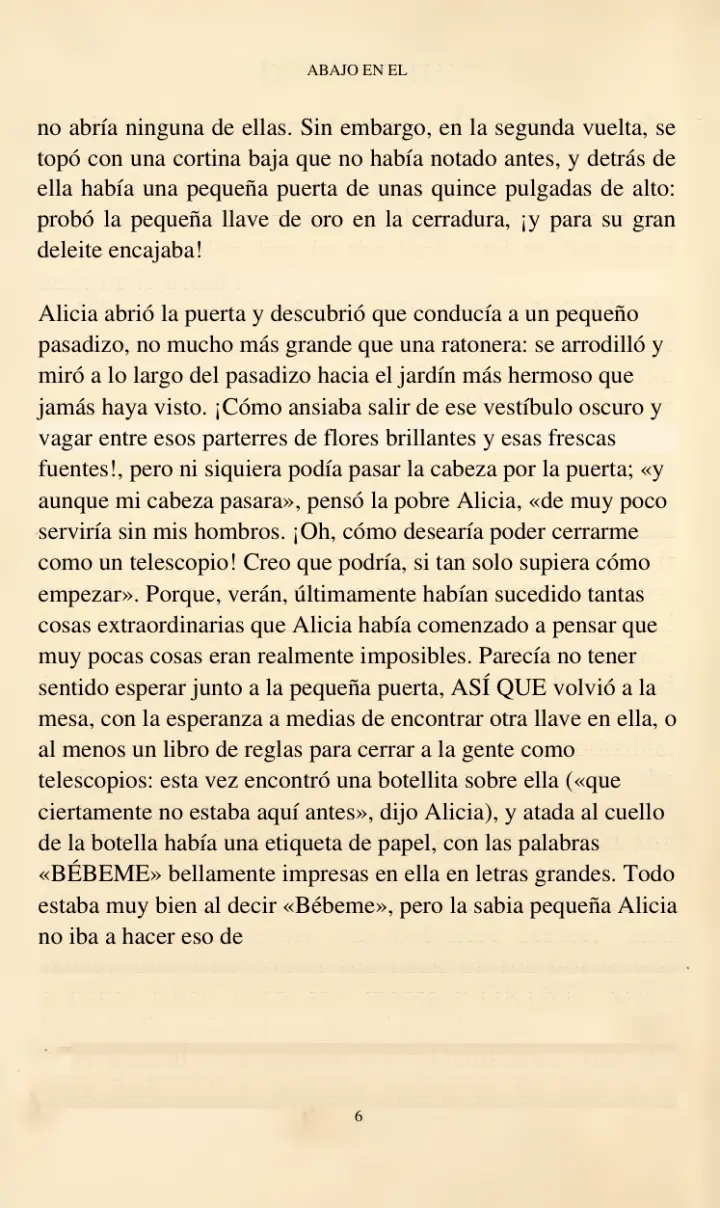
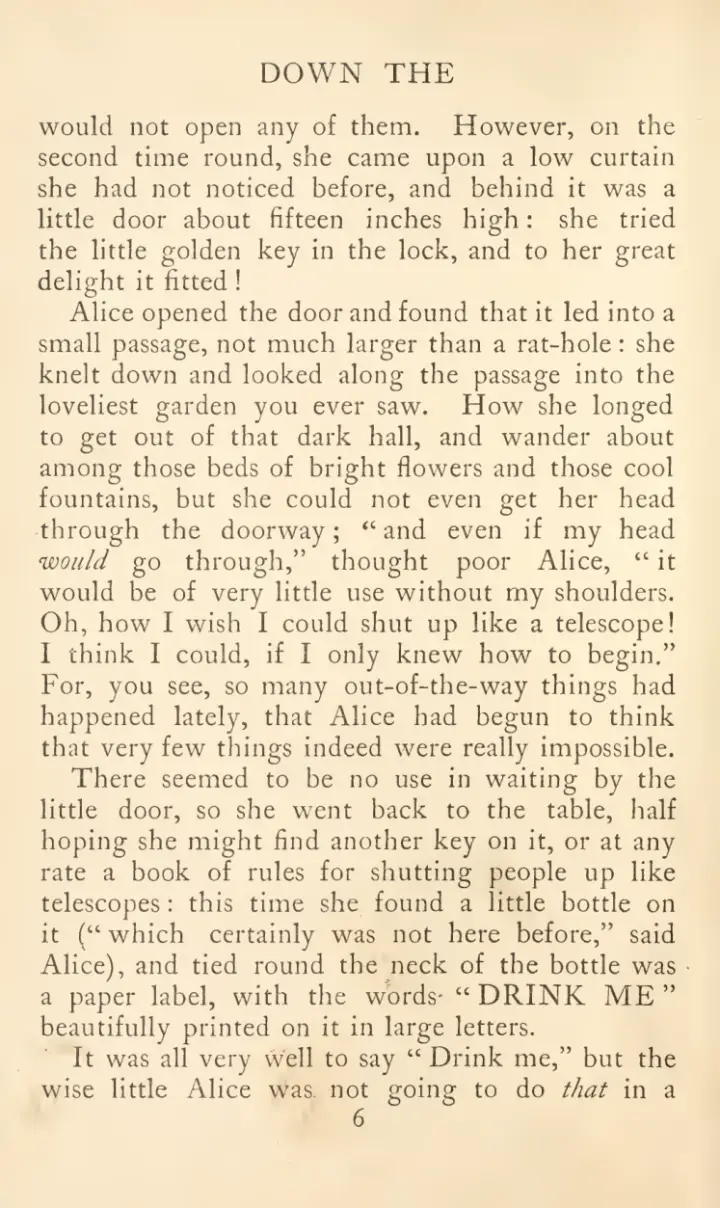
A scan Google would leave in English
A scanned English book page translated to Spanish, and a Word CV returned as an editable file. Drag the handle to compare.
A 1907 scan of Alice's Adventures in Wonderland
- The yellowed page was read with OCR, then translated
- Paragraphs, the running head and the page number stay in place
- Dialogue uses Spanish «comillas» and ¡inverted marks!
Public-domain scan (archive.org), pages 25–27 of 344. Unedited output from our document-quality run. A faint trace of the source text can remain on aged scans.
Why Google Translate fails on some English documents
Google's own help page lists the limits. If your file hit one of them, this is what changes when you upload it here instead.
The usual way
- Documents over 10 MB are rejected
- PDFs over 300 pages are rejected
- Scanned pages and text in images stay in English
- No EPUB files, and no document translation on a phone
With PageTranslate
- 1
Upload the English file
PDF, DOCX or EPUB up to 100 MB, from a computer or a phone.
- 2
Scans are read first
Scanned pages go through OCR, then get translated to Spanish.
- 3
Download the Spanish file
Same format, with the exact price shown before you pay.
Real output, not a mockup
English to Spanish, sentence by sentence
The opening of Pride and Prejudice, unedited. English quotation marks become Spanish comillas, and the dialogue reads as Spanish rather than word-for-word English.
It is a truth universally acknowledged, that a single man in possession of a good fortune, must be in want of a wife.
SpanishEs una verdad universalmente reconocida que un hombre soltero, poseedor de una gran fortuna, necesita una esposa.
“My dear Mr. Bennet,” said his lady to him one day, “have you heard that Netherfield Park is let at last?”
Spanish«Mi querido señor Bennet», le dijo un día su esposa, «¿ha oído que al fin se ha alquilado Netherfield Park?»
Mr. Bennet replied that he had not.
SpanishEl señor Bennet respondió que no.
“But it is,” returned she; “for Mrs. Long has just been here, and she told me all about it.”
Spanish«Pues así es», replicó ella; «porque la señora Long acaba de estar aquí y me lo ha contado todo».
What happens to your file
Built for whole documents, not sentences
What happens between upload and download, shown with real output from our translation engine.
Meaning, not word for word
Text is translated in passages, so idioms read the way a person would write them.
智に働けば角が立つ。
Work with wisdom and corners stand up.
Approach life through reason and you sharpen your edges.
日本語 → EnglishNames stay the same
Character, place and product names are kept as written from the first chapter to the last. Real output from Pride and Prejudice:
“My dear Mr. Bennet,” said his lady to him one day, “have you heard that Netherfield Park is let at last?”
« Mon cher M. Bennet, lui dit un jour son épouse, avez-vous appris que Netherfield Park est enfin loué ? »
The layout stays put
Headings, columns, figures and page breaks keep their place. You get a translated file, not a text dump.
OCR for scanned pages
Scanned and photographed pages in English, French, German, Italian, Portuguese and Spanish are read before translation.
OCR: “DRINK ME”
«BÉBEME»
The right font for every script
Translated PDFs embed bundled open-source Noto fonts, so Khmer, Arabic or Thai text shows up on devices without those fonts.
ខ្មែរ
Noto Sans Khmer
العربية
Noto Sans Arabic
हिन्दी
Noto Sans Devanagari
ไทย
Noto Sans Thai
עברית
Noto Sans Hebrew
ქართული
Noto Sans Georgian
বাংলা
Noto Sans Bengali
தமிழ்
Noto Sans Tamil
The exact price first
Every line of the quote, calculated from your file, before you pay.
Your quote
novel.epub · 80,000 words
Total—
Shown before payment · Guest checkout
Which Google method?
Google Translate or Google Docs
Use the Documents tab in Google Translate when you have a Word, PDF, PowerPoint or Excel file on your computer and want the same kind of file back. Use Tools → Translate document in Google Docs when the document already lives in Google Drive; you get a Spanish copy in Drive, not a download.
If Translate document is missing from the Tools menu, the file is open in Office editing mode. Save it as a Google Doc first.
When to switch
When Google Translate is not enough
Long reports, theses, manuals and books often pass 10 MB once they contain images. Scanned contracts and older PDFs come back with the English still on the page. In those cases, upload the file above: it is translated as one job, scanned pages included, and returned as a PDF, DOCX or EPUB.
PageTranslate is an independent service and is not affiliated with Google.
70 languages, 9 file types
The source language is detected for you. Pick the target at checkout, and get your file back in the format you uploaded.
70 target languages
From Spanish, German and Portuguese to Japanese, Arabic, Swahili and Khmer.
What to check before you rely on it
- PowerPoint (.pptx) and Excel (.xlsx) files are not supported here; Google Translate handles those.
- Spanish is a single option. There is no separate Latin American or Spain setting.
- This is not a certified or sworn translation. Immigration, court and university documents usually need a certified translator.
- Forms with many small boxes can shift. Check those pages.
Know the cost before you commit
English to Spanish document prices
Google Translate is free. Here you pay per 1,000 words, rounded up, and see the exact total before paying.
Calculate the price for your word count| Length | Guest | Free account | Pro |
|---|---|---|---|
| Letter or short report2,000 words | |||
| 30-page report12,000 words | |||
| Thesis or manual60,000 words |
Estimates from the live price list, including layout preservation and the per-document fee. Free assumes your 3,000 starter words are unused; Pro includes 30,000 words each month. Your exact price appears after upload, before you pay.
Related translation pages
- Document Translation SoftwareSelf-service translation for PDF, Word and EPUB files, with an exact quote before you pay.
- Translate My Book to SpanishSpanish is preselected. See an unedited Spanish sample, then get the exact price for your manuscript.
- PDF TranslatorTranslate digital, scanned or mixed PDFs and download a PDF that keeps its page layout.
- Translate Large PDFUpload one long PDF up to 100 MB in a single job, with no splitting into parts.
Before you upload
Google Translate English to Spanish documents FAQ
How do I translate a whole document from English to Spanish in Google Translate?
On a computer, go to translate.google.com, click Documents, set English to Spanish, browse to a .docx, .pdf, .pptx or .xlsx file up to 10 MB, click Translate, then Download translation. PDFs must be 300 pages or less.
How do I translate a document in Google Docs?
Open it in Google Docs, click Tools → Translate document, name the copy, choose Spanish and click Translate. The Spanish copy is saved to your Google Drive.
Can I translate a document with Google Translate on my phone?
No. Google says document translation isn't available on mobile or smaller screens. You can upload the file on this page from a phone browser instead.
Why is my scanned PDF still in English after Google Translate?
Google Translate does not translate scanned pages or text inside images. Upload the scan here: the pages are read with OCR first, then translated to Spanish.
How do I translate an English document larger than 10 MB to Spanish?
Upload it on this page. Files up to 100 MB are accepted, and PDFs up to 1,000 pages, without splitting the document into parts.
File too big or scanned for Google?
Upload the English document and see the exact Spanish price before checkout.
When Google can't translate itJobs of 50,000 words or less come with a 7-day re-run or refund guarantee.