EPUB Merger
This EPUB merger joins two or more EPUB files into one ebook with a single table of contents. It runs in your browser, so your books are never uploaded anywhere.
- Free, no sign-up
- No upload: works on your computer
- No file or size cap
- 0 errors in EPUBCheck 5.4.0
Drop your EPUB files here
or click to choose them. Pick two or more.
How to merge EPUB files
- 1
Drop in your EPUB files
Add two or more books at once, or a few at a time. Each one shows its cover, author and number of chapters.
- 2
Put them in reading order
Use the arrows to move a book up or down. For a pile of numbered chapter files, press Sort by file name.
- 3
Name it and download
Type a title and press Merge. The first book's cover becomes the cover. The new EPUB lands in your downloads folder.
What happens inside the merged EPUB
An EPUB is a ZIP file of web pages with a list of chapters (the package file) and a contents page. Merging means building one new list and one new contents page that point into every book. Here is what this tool does:
- The Adventures of Sherlock Holmes.epub · 15 chapters
- The Memoirs of Sherlock Holmes.epub · 15 chapters
- The Return of Sherlock Holmes.epub · 16 chapters
sherlock-holmes-omnibus.epub
mimetypefirst in the file, uncompressed, as the EPUB rules requireOEBPS/content.opfnew package: 46 chapters in reading orderOEBPS/nav.xhtmlnew contents: one entry per book, its chapters nestedOEBPS/toc.ncxthe same contents for Kindle and older readersOEBPS/b1/The Adventures of Sherlock Holmes, untouched (15 chapters)OEBPS/b2/The Memoirs of Sherlock Holmes, untouched (15 chapters)OEBPS/b3/The Return of Sherlock Holmes, untouched (16 chapters)
chapter1.xhtml or a style.css never overwrite each other.- One contents page with every book. Each book is a top-level entry and its own chapters sit under it, so your reader can jump straight to book three, chapter four.
- EPUB 3 in, EPUB 3 out. If any book is EPUB 3, you get EPUB 3 with an old-style NCX contents file as well, for Kindle and older readers. If every book is EPUB 2, you get EPUB 2, because EPUB 2 chapters break the stricter EPUB 3 rules.
- Fonts keep working. Many publishers scramble embedded fonts with the book's ID. A merged book gets a new ID, so the fonts would turn to garbage. The merger unscrambles them first.
- Manga and right-to-left books keep their page direction when all the books agree on it.
- DRM-protected books are refused with a clear message. We don't remove DRM. Books bought from the big stores usually have it; Project Gutenberg, Standard Ebooks and most author-direct files don't.
We tested it on three Sherlock Holmes books
On October 19, 2026 we downloaded the EPUB 3 editions of The Adventures, The Memoirs and The Return of Sherlock Holmes from Project Gutenberg and merged them here.
- Three files, 1.84 MB together, became one 1.82 MB EPUB with 46 chapters.
- EPUBCheck 5.4.0, the official validator, found 0 errors and 0 warnings.
- Funny detail: each of Gutenberg's own three files fails EPUBCheck with one error (an attribute in its contents page). The merged book passes because the merger writes a fresh contents page.
- We repeated it with the EPUB 2 editions, and with a mix of EPUB 2 and EPUB 3. Both passed with 0 errors.
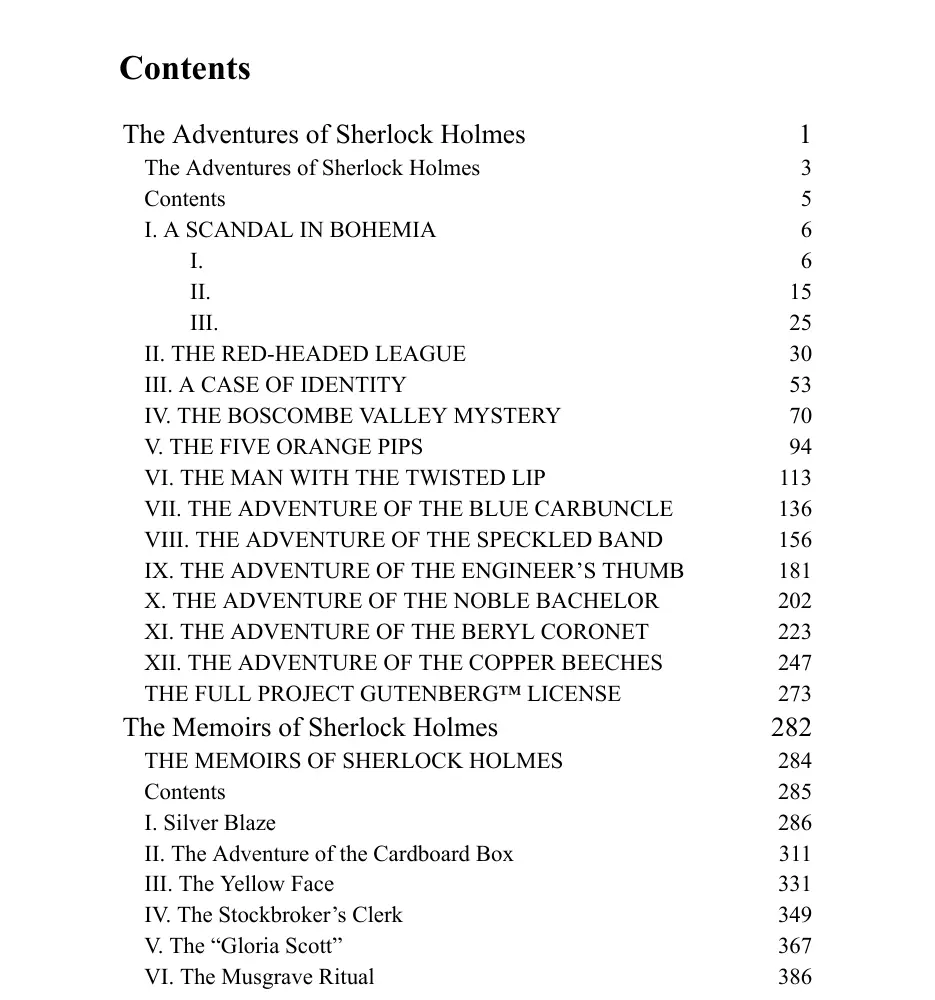
- calibre 7.6.0 opened the result and turned it into an 844-page PDF. Its contents page, on the right, shows all three books with their stories nested underneath. The Memoirs starts on page 282.
The same checks run automatically each time we change the tool, along with a book whose fonts are scrambled and a fake DRM-protected one, which the tool must refuse.
EPUB merger options compared
Every other web tool we found uploads your books to its server. Here is how the usual choices stack up.
| Tool | Where it runs | Limits | Contents page | Cost |
|---|---|---|---|---|
| This EPUB merger | Your browser, nothing uploaded | None, beyond your computer's memory | One entry per book, chapters nested | Free |
| OnlineConverter | Uploads to their server | 4 files, 200 MB | Not described | Free, ad-supported |
| GroupDocs | Uploads; deleted after 24 hours | 10 files, 5 merges a day | Not described | Free, Premium $7/month |
| Aspose | Uploads; kept 24 hours | 10 files, 10 MB each | Not described | Free |
| EpubMerge (calibre plugin) | Your computer, needs calibre | None | Per book, nested or flat | Free, EPUB 2 output only |
Prefer calibre? Use the EpubMerge plugin
If you already keep your library in calibre, the free EpubMerge plugin by JimmXinu does the same job on your desktop and adds the merged book to your library.
- In calibre, open Preferences, then Get plugins to enhance calibre, and install EpubMerge. Restart calibre.
- Select the books in your library and click the EpubMerge button.
- Put them in order, edit the title, authors and series, and press OK.
Note that calibre's own book editor can't merge two separate books; its Merge command only joins files inside one book. This short video shows the plugin route:
Before you merge: tips from people who do this a lot
- Put the book with the best cover first. Its cover becomes the cover of the merged book.
- Very large merges get slow on e-readers. calibre users on Reddit report trouble with single files above roughly 300 to 600 MB. For a long manga run, merge by volume.
- Kindle: Amazon's Send to Kindle accepts EPUB files, so you can send the merged book as it is. If you convert it yourself in calibre, choose AZW3 rather than MOBI; users report that MOBI flattens a nested contents page.
- Every book keeps its own front matter. Copyright pages and "also by" pages stay where they were. That keeps each book complete; delete them in calibre's editor afterwards if they bother you.
- Need it in another language? Merge first, then translate the whole omnibus in one go with our EPUB translator. You pay for the words once, and names stay consistent across all the books.
FAQ
EPUB merger questions
Is this EPUB merger free?
Yes. There is no sign-up, no daily limit and no watermark. It is free because it runs on your own computer and costs us nothing per merge.
Are my EPUB files uploaded?
No. The files are read and merged by your browser. Nothing is sent to our servers, and the tool keeps working if you go offline after the page has loaded.
How many EPUB files can I merge?
As many as your computer's memory allows. We set no limit on the number of books or on their size.
Will the table of contents be kept?
Yes. The merged book gets one contents page with each book as a top-level entry and that book's original chapters nested underneath.
Can I merge EPUB 2 and EPUB 3 books together?
Yes. A mix produces an EPUB 3 file, and the tool cleans up the EPUB 2 habits that EPUB 3 rejects most often. Our mixed test passed EPUBCheck with no errors.
Can I merge DRM-protected books?
No. If a file is DRM-protected, the tool tells you and leaves it out. We don't remove DRM.
Which cover does the merged book use?
The cover of the first book in the list. Move the book you want on the cover to the top before you merge.
Can I merge PDF, MOBI or AZW3 files?
Not with this tool. Convert them to EPUB first, for example with calibre, then merge the EPUBs.
Can I split the merged book again later?
Keep your original files; they are not changed. To split an EPUB, calibre's EpubSplit plugin, by the same author as EpubMerge, does that job.
Does it work on a phone, Mac or Linux?
Yes, in any current browser: Chrome, Edge, Firefox or Safari. On an iPhone, choose the files from the Files app.
More for your ebooks
- EPUB TranslatorTranslate a DRM-free EPUB and keep its chapters, table of contents and reflowable layout.
- Translate a BookUpload a whole PDF, EPUB or DOCX book and get the translated file back in the same format.
- Translation Cost CalculatorType a word count and compare AI, AI plus an editor, and a professional translator.
- French Word CounterCounts French words the French way, plus signes, feuillets and reading time.
Translate the merged book
Upload the omnibus as one EPUB and get it back in another language with its chapters and contents in place. You see the exact price before you pay.
Drop your book
PDF, EPUB or DOCX up to 100 MB. See the price before you pay.
Drop your file here
or click to browse your computer