EPUB or MOBI for Kindle? Which Format to Use Now
By PageTranslate Team · · 4 min read
When it comes to epub or mobi for kindle, use EPUB. Amazon KDP stopped accepting MOBI for reflowable books on August 1, 2021 and for fixed-layout books on March 18, 2025, and asks for EPUB, DOCX or KPF instead.
MOBI isn't gone everywhere, which is why old advice keeps circulating. Kindle e-readers still open unprotected MOBI files, and calibre 9.15 still writes them. I sent one EPUB through MOBI and back to see what that costs. It kept 99.86 percent of its words and came out with a second copy of the cover and 4 EPUBCheck errors, where the AZW3 route returned none.
DRM-free EPUB in, EPUB out. Exact price before you pay.
Short answer, use EPUB for new Kindle books
For new uploads and updates to reflowable books, KDP's own help says to use EPUB, DOCX or KPF, and that MOBI is no longer supported for reflowable content. Amazon then converts what you upload. KDP's pages never name the result, but they say older devices receive a KF8 version and that Kindle processes EPUB and MOBI the same way.
MOBI still matters for old files already in a library or on a device.. It isn't the format to start a new book in.
What EPUB, MOBI and AZW3 are
- EPUB. The open standard for reflowable ebooks, which adapts to the screen and the reader's settings. It's accepted by KDP and by most other stores.
- MOBI. The older Mobipocket-era format. Calibre's default MOBI output is still the old MOBI 6 flavor.
- AZW3 (KF8). Amazon's newer Kindle format. Authors rarely need to make one, because Amazon produces it from your upload.
You will also see KFX, the name the community uses for the Enhanced Typesetting format. Amazon's help pages don't use that word, and calibre can only write it with a third-party plugin that needs Kindle Previewer installed. In my run, asking calibre for KFX ended in a "No plugin to handle output format" error.
EPUB vs MOBI for Kindle publishing
| EPUB | MOBI | |
|---|---|---|
| KDP, reflowable books | Recommended | Not supported since Aug 1, 2021 |
| KDP, fixed-layout books | Accepted | Not supported since Mar 18, 2025 (new uploads and revisions) |
| Send to Kindle | On the accepted list | Not on the list |
| Kindle e-reader, file copied by USB | Not native, needs conversion | Unprotected MOBI read natively |
| Other stores | Broad support | Mostly Amazon and legacy |
What about fixed-layout books?
Children's picture books, comics, cookbooks and design-heavy titles use fixed layout. Amazon's FAQ says that as of March 18, 2025 it no longer supports MOBI for fixed-layout ebooks, with EPUB or KPF taking its place. It applies to new uploads and revisions, and both EPUB 2.0 and 3.0 are accepted. Kindle Create exports KPF or EPUB.
Amazon's own pages disagree a little. The supported-file-types page still says it "will" stop accepting MOBI, and a languages page still lists .mobi. Read the FAQ and check the live upload requirements before you publish.
Convert EPUB to a Kindle-friendly file with calibre
- Add the EPUB to calibre.
- Select it and choose Convert books (the shortcut is C).
- Pick AZW3 as the output format, or MOBI for an old device, and set a Kindle output profile as the manual advises.
- Open the result in calibre's viewer and then on a Kindle or the Kindle app.
My run used ebook-convert from calibre 9.15 with the default profile, on Project Gutenberg's EPUB 3 of Alice's Adventures in Wonderland (189 KB). AZW3 took 1.7 seconds and came out at 255 KB. MOBI took 2.5 seconds and came out at 457 KB. I didn't open either on a Kindle, so layout on a real device is untested.
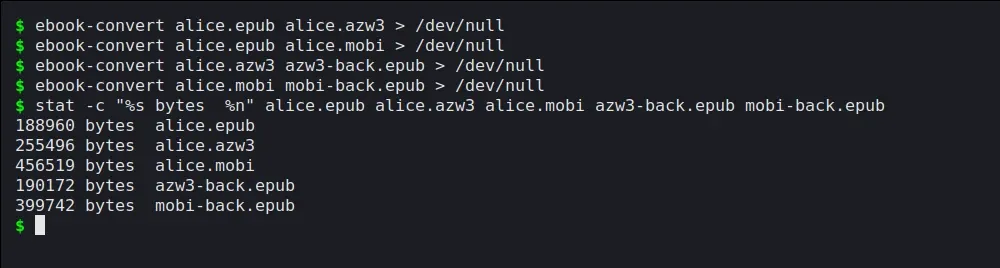
The conversions, run for real. The sizes are in bytes.
Should you convert MOBI to EPUB?
Yes, if you are updating book, republishing it or selling beyond Kindle. Use calibre, then inspect the result, because the route matters.
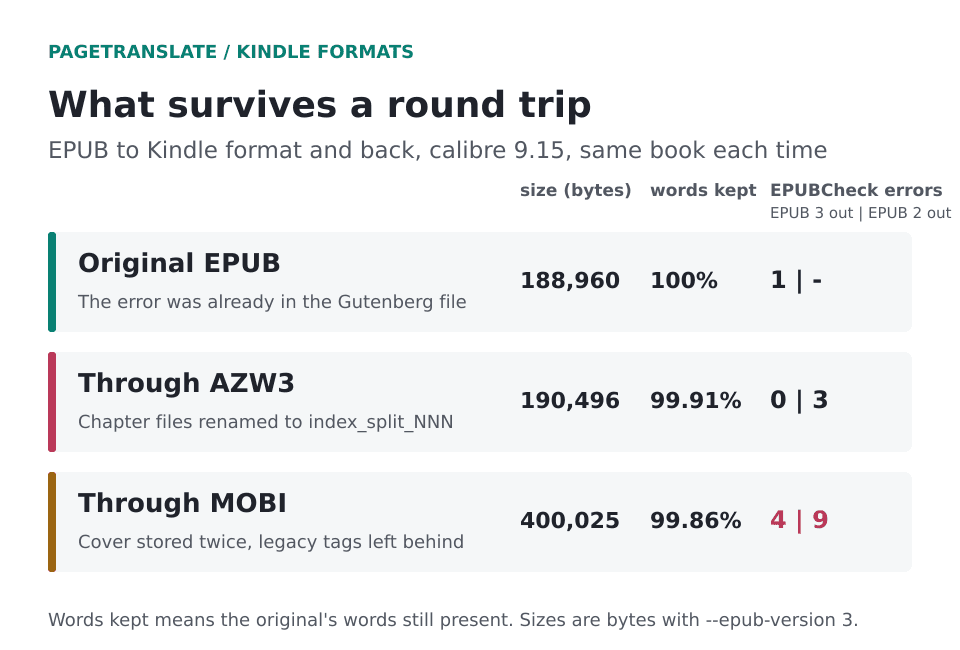
The same book, three ways. EPUBCheck counts are for calibre's EPUB 3 output and for its default EPUB 2 output.
Through AZW3 the book kept 99.91 percent of its words, and EPUBCheck found no errors in the EPUB 3 output. Through MOBI it kept 99.86 percent, doubled in size to 400 KB because the cover was stored twice, and left legacy markup (valign and value attributes, a tt element) that EPUBCheck rejects. Both round trips renamed every chapter file to index_split_NNN and merged three stylesheets into two. Calibre also added an inline table of contents page of its own.
Calibre's default EPUB output is version 2, and EPUBCheck was harder on it (3 errors via AZW3, 9 via MOBI), so add --epub-version 3 if your source was EPUB 3. Proof headings, images, footnotes and the table of contents every time. Automated conversion can introduce formatting problems, and how to edit EPUB files covers the repairs.
Translating an EPUB for Kindle
Translate the original EPUB. The round trip above is the reason, since a MOBI or AZW3 detour renames files, merges styles and, in MOBI's case, leaves old tags behind. PageTranslate takes a DRM-free EPUB, PDF or Word file and returns EPUB for EPUB input, with chapters and table of contents kept. It doesn't read Kindle formats such as MOBI or AZW3, and it doesn't remove DRM.
For a novel, the AI novel translator page shows real output, and there is a Spanish route for the most common target language. Then upload the translated EPUB to KDP, or send it to your own Kindle through Send to Kindle, which takes EPUB files of up to 200 MB. The Kindle translation guide walks through the reader's side, and opening an EPUB on Kindle covers sending it.
If a translated edition is part of a bigger plan, how hard is it to get a book published covers the costs and the rights questions, and how to publish a book for free covers the upload. The cost FAQ shows how translation pricing works.