How to Publish a Book for Free
By PageTranslate Team · · 10 min read
Free book publishing usually means the same thing as free self-publishing. It typically means that the service does not charge to upload your finished book. You will still need to spend money on editing, cover design and printing. But Amazon KDP, Kobo Writing Life and Apple Books all offer free self-publishing of e-books.
A useful route for authors working with no cash budget for book publishing is to consider releasing an ebook first as this is generally the simplest format to release first. There are no physical copies to order and to ship to customers. The links below will take you to the current information for each platform on October 2, 2026.
Check costs and distribution before choosing.
What free book publishing actually includes
Publishing services use "free" to describe several things:
- Free to upload: There is no cost to you to upload your finished book to a Publishingservice.
- Covering the printing costs of copies ordered by readers. The copies are only printed after an order has been placed.
- Free for the reader: This means that you can publish your book and set it at a price of zero. Readers can then download your book for free. Note that just because you are offering your book for free to readers, that doesn’t mean that free publishing services are available to you.
There’s an important point to note, though: all of these ‘free’ book publishing offers are not created equal. While you may be able to upload your finished book for free, you will probably have to pay to edit it and to format it for print. And while a print-on-demand service may not require you to purchase any inventory of your book in advance, they will charge you for each print they make, which will be deducted from the sale price.
Lastly, if a physical format is central to the book (e.g. a workbook), we would publish the ebook first, allowing the author to test out the digital edition first, prior to taking on the costs of printing physical copies.
Platforms with a direct, no-upload-fee route
| Platform | Useful for | What to understand before choosing |
|---|---|---|
| Amazon KDP | Kindle ebooks and print-on-demand editions | Publishing is free; royalty deductions and optional Select enrollment are separate |
| Kobo Writing Life | Direct ebook distribution to Kobo readers | Free publishing, nonexclusive distribution; royalty terms depend on price and content |
| Apple Books | Direct ebook publishing for Apple Books readers | No publishing fee; Apple advertises 70% ebook royalties and supports free reader pricing |
| Your own permitted download | Family books, course material or a free community edition | No store discovery, retail reporting or automatic royalty collection; hosting may have limits |
You actually upload your ebook to stores’ websites, not through an aggregator. Yes, it’s that easy! However, keep in mind that simply uploading to one store does not mean your ebook automatically goes live on that other store. In addition, some of the stores’ programs and services are optional, such as KDP Select (more on this below).
Check the account eligibility prior to uploading your book as there are varying payment methods, tax onboarding and countries supported by each of the stores. Ensure that the service can pay you prior to uploading the files to individual stores for separate accounts.
Why Draft2Digital is not in the zero-cash column
It’s worth noting that although Draft2Digital is the best aggregator for authors, for a new launch by an author, it’s not a zero cash option. For new Draft2Digital accounts activated after 2026, there is a $20 activation fee. There is also a $12 annual fee for accounts that have less than $100 in net book-sales proceeds over the last 12 months.
This fee does not apply to existing D2D accounts. If you are new to publishing and are looking for a zero cash launch to these stores, then managing the direct store accounts may be your best option. For established authors, though, D2D’s convenience may still be worth this new cost structure.
Prepare a publishable manuscript without buying software
The manuscript can be written in a free word processor. But to organize the chapters, to complete the editing, and to export the manuscript correctly as a file (ebook or print), a word processor is needed.
I would do four different reads for editing a book: structural edits, comprehension edits, copy-edits, and proof-reads.
- Structure: chapter order, missing chapters, does the book deliver on promises made to reader?
- Clarity: unclear sentences, plot holes, repetition and unproven facts.
- Copyediting: spelling, punctuation, capitalization and consistent names.
- Proofreading: mistakes introduced during formatting and export.
Also, to get the most out of your beta readers, you should know what to look for. So for a practical guide, ask if the reader can follow your instructions. And for fiction, ask where a character’s motivation failed or where the sequence of events got unclear.
Rather than investing in an elaborate book launch, we would recommend authors use the time to complete a second read of their manuscript to sort out any problems before they become apparent in a buyer’s sample or in a review.
You need to review any grammar tool’s changes to your work in context (especially names, technical terms and dialogue), and keep earlier versions of your work in case you need to reverse changes.
Format an ebook and make a usable cover
For a practical guide, reflowable text (ordinary prose) is better than fixed layout for an ebook. Spaces and blank lines are not as good as heading styles, navigation links, and proper page breaks for a structured print book, but are better than nothing for an ebook.
Amazon also provides a Kindle Previewer which allows you to check out how your ebook will look, check out the navigation, spacing between paragraphs, font sizes and how any images you have included will look as well as reading through the text itself.
Make sure the title and author are clearly readable on the book cover when viewed as a thumbnail. It’s often easiest to find a simple design for a book cover, which can be created with a free book cover maker. Also, check the licenses for the fonts, images and any templates you use, because a free design tool may include individual images that cost money to use.
The ebook and print edition need different files:
- Ebook manuscript: working table of contents, chapter order and useful image alternative text.
- Ebook cover: Title and author of ebook on cover in appropriate position on the front. eBook cover files are in appropriate format for chosen publishing platform (e.g. Amazon: .jpg or .png).
- Print interior: file size, file type and specifications for trim size, margins, end-of-chapter page numbers and any bleed required.
- Print cover: front, spine and back. Note: the dimensions will depend on your interior and cover’s paper type and your final page count so can change during the interior edit phase and then need to be re-exported.
The paperback cover is made of 3 parts: Front, Back and Spine. The size of the cover depends on the number of pages and the paper type of your paperback. Therefore, when you change the interior of your paperback, you will also need to export the new cover.
ISBNs, rights and account details
Kindle Direct Publishing (KDP) books do not require an ISBN. Free ISBNs are available for print copies of hardcover and paperback books published through KDP, which will list the book under “Independently Published”. Note, however, that these ISBNs are restricted to use with KDP and are not transferable. Some book types, including low-content books, have their own special rules, as outlined by Amazon.
Note: For distribution through your own imprint to other stores, such as Google, Apple, or Nook, the same print edition will require a new ISBN, distributed by your national ISBN agency. The cost of an ISBN varies between countries and services, see qualified advice below.
Before submitting the edition, confirm that:
- You have full control of the text and have secured any necessary translation rights.
- You have permission for the quotations, illustrations, photographs and cover used in the ebook as required.
- Contributor names and any translator credit are accurate.
- Rights territories match your actual permission.
- Required identity, payment and tax details are complete.
As for books in the public domain, it is important to note that these can be checked on a country by country basis to ensure that whilst the source text may be out of copyright, a translation or even the cover design may not. The author would be well-advised to seek qualified advice in such cases to clarify the rights and ensuring that all are in order for publication.
A step-by-step zero-cash ebook launch
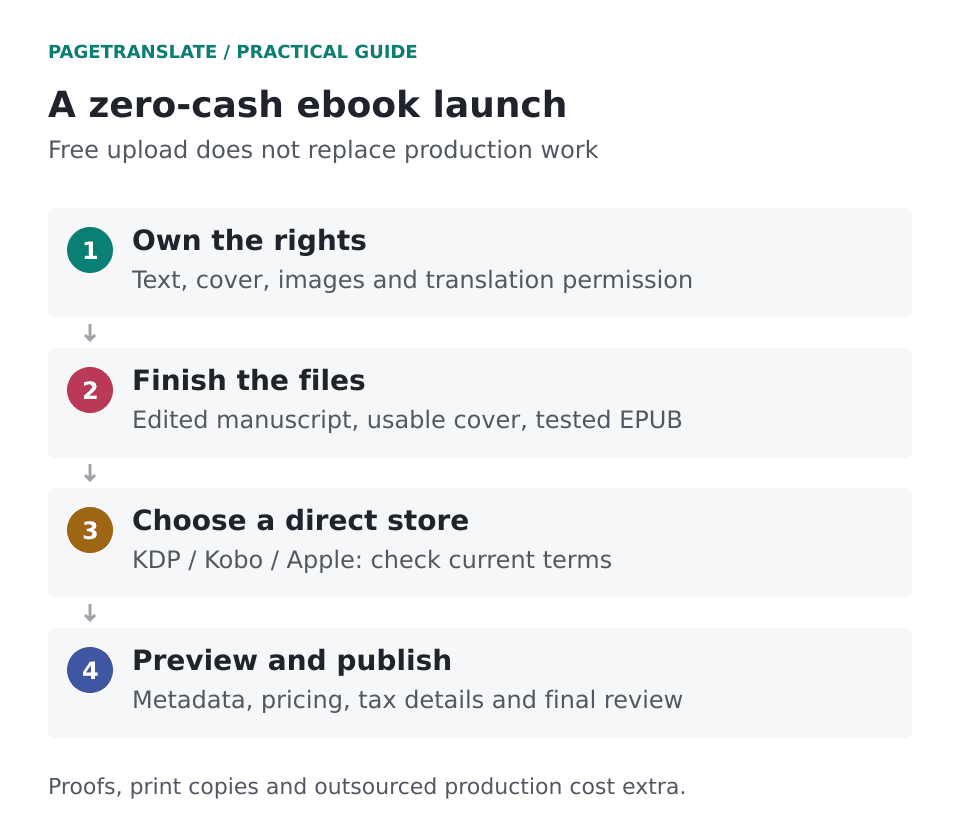
If you wish to distribute a book via stores such as Amazon then the store will deal with the publishing process. The author therefore simply needs to prepare a manuscript, a cover and the edition details for printed books.
- Identify your readers. Decided whether to offer your book as an ebook, print edition or both.
- Make sure a reviewed manuscript is finished, all feedback from beta-readers is integrated and all export versions of the manuscript (not the working document) have been proof-read.
- Prepare cover, final and ebook versions of your book. Make sure you keep the original source files so that you can make any necessary corrections in the future.
- Create a new account in the store where you want to publish your ebook. Fill in all required information for onboarding, including payment information and tax identification.
- Accurately upload the book’s metadata (all information about the book) (book title, book subtitle, author(s), book language, book description, relevant categories).
- Choose territories & distribution channels. Determine if you wish to make any of your content exclusive to our platform.
- Determine the price of your book, and more importantly, the royalty you’ll receive on that price.
- Check that the front matter, the middle of the book, the end of the book, your end notes, any tables, and any image heavy chapters have all transferred correctly.
- Publish and verify – check the live book store listing for cover, sample chapter, language, full book description and edition details.
- Log all corrections. Keep a record of the version you released and, should there be any errors reported by readers, fix them and re-export as updated versions of the book.
Stores generally take a few days to approve your manuscript before they can put your book up for sale, so factor that time in to your launch date. Then check your book out on stores’ websites a few days after you’ve uploaded it to confirm that they have everything up correctly.
Paperback publishing: free setup is not free printing
When using print-on-demand the copies are printed as orders are received, so no copies are printed in advance, as is the case with traditional publishing. The amount of printing costs deducted from the author’s share of the sales price depends on several factors including the book size and type, the author’s retail price, and the royalty rate being paid. In addition to printing costs, proof copies, author copies, and shipping costs are typically additional to the printing costs, and are usually paid by the author.
For the print version of a book, a physical proof should be budgeted for. A physical proof enables an author to check whether sufficient margins have been allowed, the color to be used is correct and whether the work will read well.
Our free Amazon publishing guide contains a US paperback margin estimator which will help you compare the printing cost of your Paperback with your production cost and work out how many sales you will need to recover your production costs.
Plan a translated edition as a separate release
It’s also worth noting that while production for a translated edition is separate to that for the original language, a published translated edition can be published on the same no-upload-fee platforms as the original language edition.
In terms of file behavior, we found that translated EPUB files maintained the chapter structure and hyperlinks to endnotes that we checked. However, an author would have to read through a translated edition to check for issues of meaning, consistent use of recurring names, and overall reading experience.
Note that authors with the relevant rights can use a paid-for production service such as PageTranslate to get a file-based translation of their book. We outline the cost of such translations in our Translation Cost Guide, and discuss how you can get bilingual review added in there too.
KDP Content Guidelines state that Amazon considers generated content (e.g. text, images and translations) as different from AI-assisted editing. Once generated, such content falls into the Generation category and the author will continue to edit said content thereafter.
Also, as an Amazon KDP author you can make use of Kindle Translate which is currently in beta for eligible authors. We have written a Kindle translation guide for you detailing the supported routes and how to see if you are eligible to use the service.
Check what a paid publishing package includes
And remember, an author can always pay for later items such as editing or cover design or even distribution. They just need to be aware of what they are buying and of the fine print. Specifically, watch out for bestseller guarantees and for where the author is forced to purchase in bulk their own work.
Will I own the files and will there be an account for the book under my name? Will all rights be granted? Are there any recurring charges? Note that paid production services (e.g. editing, cover design) differ greatly from a traditional publishing contract (e.g. with a literary agent). Even if they refer to it as “publishing help” for a price – make sure you understand the terms of service.
Focus on getting a good quality manuscript, a readable-looking cover, correct rights, and all of the listing information correct for your ebook’s first release. Finding readers to read your published work is still much of the author’s work when using direct-to-ebook platforms.
Here’s a comparison of Amazon vs other platforms in terms of reach, royalty, and exclusivity.