Kindle Translation: Which Method Do You Need?
By PageTranslate Team · · 8 min read
It’s worth noting that Kindle translation of purchased books is not the same as receiving a full, authorized translation of the purchased book (this would be an eBook translation such as an authorized EPUB translation), and that the reader would need to receive a DRM-free copy of the book for him/her to translate in the first place (again, not typically the case for purchased eBooks). Furthermore, as noted above, authors and publishers of eBooks sold through Amazon’s Kindle Store may have the opportunity to utilize Kindle’s new Kindle Translate beta service (which is a separate service from the reader’s lookup translation – Review Before Send to Kindle) to produce universal reader compatible versions of their work.
Services that allow Kindle translation often receive mixed reviews and are easily mistaken with more established services such as Kindle Translation or even Kindle Dictionary. In our attempt to provide a quality resource for our readers, we will delineate what each service does best.
Review before sending to Kindle.
Choose the right Kindle translation method
| Your situation | Best next step | What it does not do |
|---|---|---|
| You understand most of the book | Select a word or short passage and open the translation option | Replace every chapter with a translation |
| You want an unfamiliar word explained | Use a dictionary in the book's language | Necessarily give an equivalent in your language |
| You want to read the whole book in another language | Find an authorized translated edition | Give you rights to copy or republish the source |
| You have your own manuscript or a permitted DRM-free EPUB | Translate the file, review it, then use Send to Kindle | Remove store DRM or create a bilingual layout |
| You are the author of an eligible KDP ebook | Check Kindle Translate availability in your Bookshelf | Provide a universal reader conversion tool |
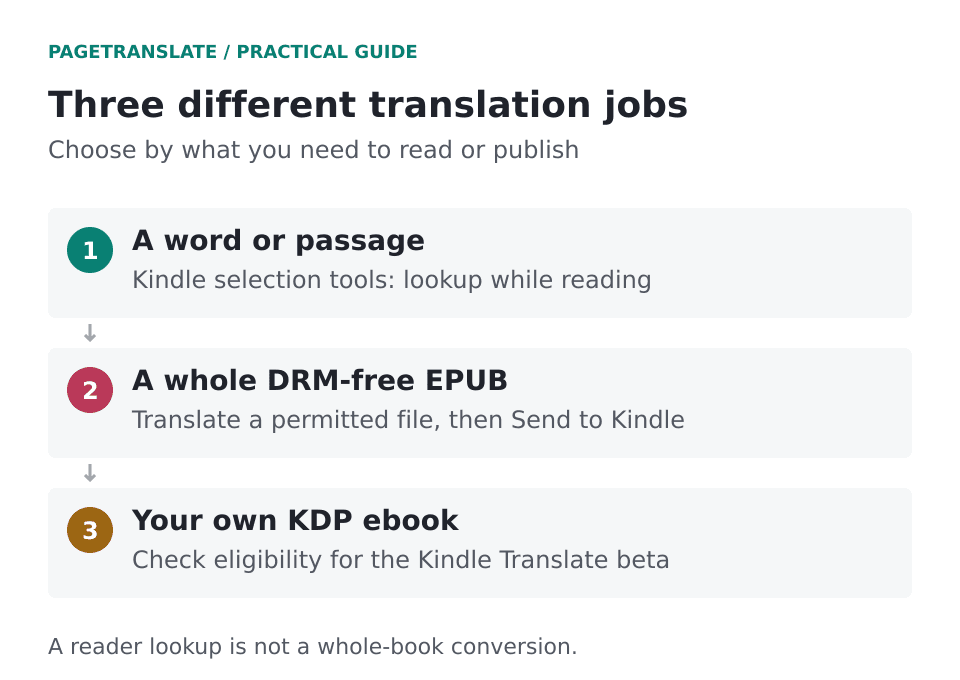
A reader’s lookup tool, a translated EPUB, and an Amazon author service all serve different purposes.
It’s useful for the occasional word or phrase, as a learner of a language. However, for almost every sentence in a book to be translated would soon become a distraction to the plot of a novel and be much better read in a complete translation of the book.
Translate a word or passage on a Kindle reader
On your Kindle, press and hold on a word in text books (not images). You can extend a highlight to a short passage of text. Press Translation in the top of the lookup panel or in the menu for a short sentence to translate it.
This works for a short sentence. Test this first with a short sentence, not the whole chapter. The Kindle user guides for each Kindle model (reader and apps) describe the menus in more detail. But a tutorial for another book might not work for your book.
- This can be distinguished from Dictionary (i.e., definition, spelling, grammar and usage – all in the original language) and Menu language (i.e., the language in which the menus are displayed).
- This is useful for providing an equivalent word or passage in another language.
- Menu language: Changes the interface language, not the language of the book itself.
Note that even though a dictionary is downloaded for offline use, the online translation service for that language will not work without an internet connection. It’s best to test this out before you travel.
Where necessary (e.g. for medical instructions or legal text) check the translated selection against the surrounding text, making any necessary referrals for qualified advice. Machine translation vs. human translation: a review guide.
Fix missing or unhelpful translation options
| Symptom | Check first | Next step |
|---|---|---|
| You cannot select words | Is the page an image, comic panel or scan? | Get a text-based edition; changing dictionaries does not create a text layer |
| Translation is missing from the first popup | Are there additional panels or an overflow menu? | Check the guide for your particular device or app |
| The result is blank or never loads | Connection and whether another short sentence works | Reconnect, retry, then restart the app or device if needed |
| The source language is wrong | Automatic detection on a short or mixed-language selection | Choose the source language manually when the menu allows it |
| A phrase is translated too literally | Idiom, character name or missing context | Select the full sentence and compare the surrounding paragraph |
| The dictionary opens instead | Definition lookup versus translation | Switch to the translation option rather than changing interface language |
Note that it’s possible a seemingly missing menu option is actually hidden in another panel. Check out Amazon’s Kindle Guide for your version of the book, and only install a third-party Kindle extension if necessary.
Read a whole translated book on Kindle
Readers wanting an entire book to read in another language first find out whether the author, the publisher or even the library is offering an authorized edition to read. Often searching by author and language will give much better results than searching by title in translation.
Yes. If you have already purchased a DRM-free copy of the book you want to read in another language, and you have permission to translate the file, you can use a file translator to make a new EPUB copy of the book to read on your Kindle.
- Keep a copy of the original EPUB.
- Upload your DRM-free EPUB to a file translator service and choose the language you would like to translate to.
- Review the quote before paying and download the translated EPUB file when complete.
- Open the translated EPUB in your typical EPUB reader and go through chapters, notes, etc. Try out special characters and quote passages of reasonable length.
- Send the reviewed file to Amazon Kindle through Send to Kindle.
- Make sure to check the book for any changes once it has arrived on your Kindle as well.
So long as Amazon’s Send to Kindle service accepts the translated EPUB (and it currently does files up to 200MB in size), that will be the route to have the translated work delivered to your Kindle.
This method does not convert an EPUB file to read on an e-reader via USB. There are other errors that can occur when sending content to your e-reader as described in how to open EPUB on Kindle.
PageTranslate outputs an EPUB file (not MOBI, AZW, or KFX). Furthermore, PageTranslate does not remove DRM from books that you bought through Amazon. Nor does buying a book from Amazon grant you permission to create and distribute another edition of a book.
What our actual EPUB output shows
A quality test of a sample of T. S. Eliot’s The Waste Land (EPUB 3) has been carried out in Spanish (Sept 2026). Verse is maintained, in this case. 734 segments have been translated; several archive entries and a number of working notes have been retained.
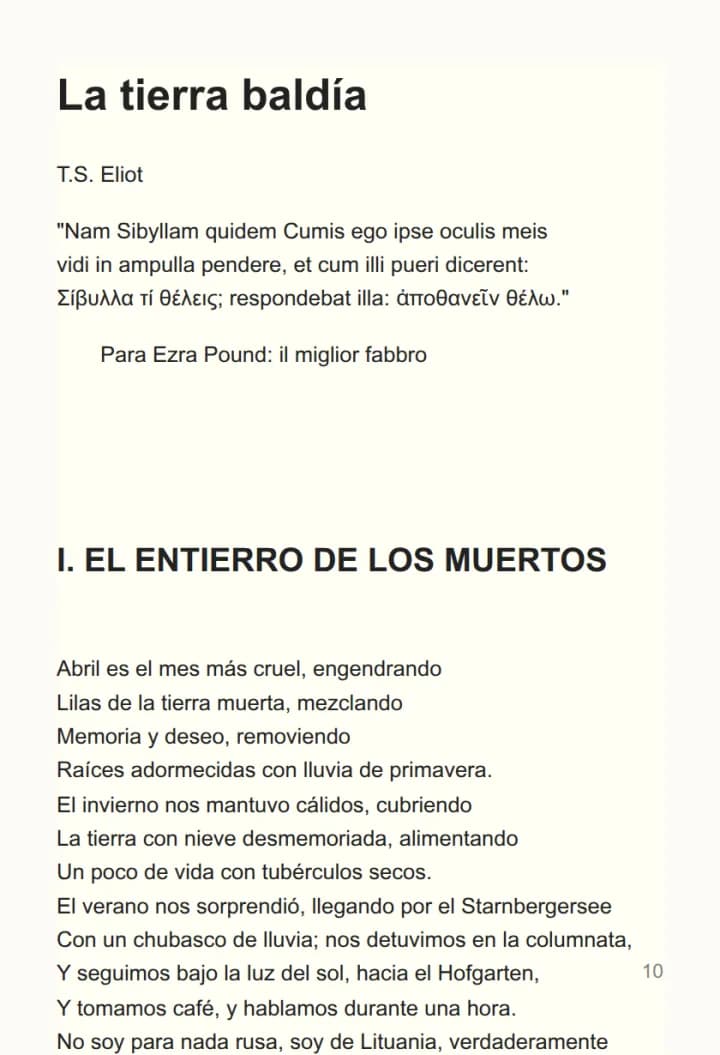
Our unedited Spanish EPUB output – seen here being read off a browser (not off of a Kindle, which we cover how to open an EPUB on, below) – translates the public domain 1922 book by the famous poet T.S. Eliot. Note that while the book is public domain in the US, this may not be the case elsewhere.
Just to be clear, while the file’s structure appeared to have translated properly, that in no way means every literary decision would have been correct to make, and I did not test for compatibility on every single Kindle model out there. Names, footnotes, and the poet’s use of several languages would all require the attention of an editor in order to publish.
Kindle Translate for authors: what changed in 2026
Note that Amazon also offers a Kindle translation service for writers of Kindle books published through Amazon Kindle Direct Publishing (KDP) in Amazon’s Kindle Store. Information on this service is provided in a start-up guide for Kindle Translate, an invite-only beta for eligible ebooks. This article was written prior to Amazon’s Kindle translation service being made available to writers.
I haven’t experimented with Kindle Translate, so the following relates solely to the information in the Amazon author documentation for Kindle Direct Publishing Kindle Translate for authors: what’s changed in 2026.
Amazon's current language table lists the following routes:
- English into French (France), German, Italian, Portuguese (Brazil) and Spanish (Spain).
- French, German, Italian, Portuguese and Spanish into English (US).
Please note that not all language pairs are supported, for example there is no French-to-German translation option listed. For further information on the languages that are supported for translation please refer to Amazon’s KDP author documentation.
This process begins with your KDP Bookshelf. Go to the language of your choice. Set up your new edition and adjust the rights and price for that book as desired. Note that enabling KDP Select makes the book eligible for automatic future translations. This will be a feature of interest to some authors, and not to others.
This preview can be helpful to authors even when they don’t speak the target language — after all, the file was created by a machine and therefore must be reviewed by a human editor who is also bilingual and can check out such things as dialog, consistent use of recurring names, and the context that must be maintained for highly unusual formatting.
Of course, there are also conditions with regard to the rights necessary for translation. In general, Amazon’s beta conditions require the same translation rights that would also be required for a regular translation; however, books consisting almost entirely of public domain material are not allowed for translation under this beta service (e.g. our Waste Land example would not be eligible for this service).
Note to authors interested in distributing their work through Amazon self-publishing: compare KDP publishing to KDP Select in this article.
Rights, privacy and quality before you upload
- Note that translation rights (i.e. the right to make and distribute copies of a translated work) are distinct from the right to copy a work. If in doubt as to the rights you need to publish a translated edition of work, it is best to seek qualified legal advice.
- DRM: only use an authorized, non-DRM (unprotected) source for your book. This guide does not provide or discuss means to bypass DRM restrictions for Kindle books.
- Confidential files: Read the Service’s privacy policy and security policy before submitting any unpublished work or sensitive information.
- When you compare more passages than just the beginning of a work (e.g. dialogue, names, notes and unusual formatting) you get a much better impression of the quality of the translation.
- The key issue: a personal reading draft is not yet a sellable edition. You need to go through the full post-editing workflow for your release.
As you can see from this tutorial PageTranslate replaces the source file with the translated EPUB file and therefore we recommend you to keep the original file for comparison with the translated file.
Most ebook translation services require a DRM-free copy of your ebook, so keep the original file for your records.