How to Edit EPUB Files (Step-by-Step with Calibre)
By PageTranslate Team · · 8 min read
Here is how to edit EPUB files without breaking them. Add the book to calibre, right-click it, choose Edit book, and fix the text, stylesheet, cover and table of contents in one window, then save and run Check book.
The table of contents is where repairs go wrong. Calibre's generate button adds entries on top of the old list, and a green tick only says a link target exists, so a chapter can point at the wrong file and still look fine. Both traps are covered below with the exact clicks.
I tested every step in calibre 9.15 on a copy of Alice's Adventures in Wonderland that I broke six ways on purpose. (I didn't try any e-reader, so nothing here claims device results.)
Same format back. The exact price shows before you pay.
What an EPUB is, and when it's fine to edit one
An EPUB is a zip file full of web pages. Text lives in XHTML files and the look comes from CSS. Images sit beside them, and two navigation files tell the reader where the chapters start.
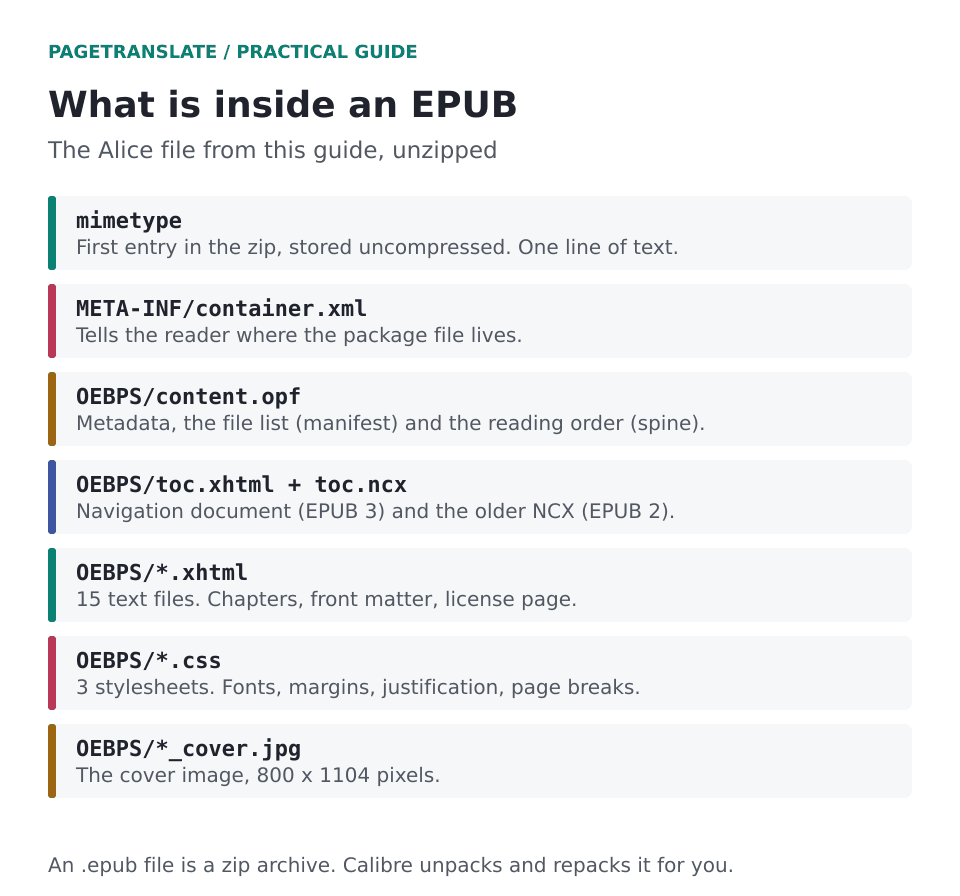
The Alice file used in this guide, unzipped. Fifteen text files, three stylesheets, one cover.
Because the text reflows, one file fits a phone and an e-ink screen alike. A careless edit shows up on both.
Edit what you own or have permission to change. A typo in your own manuscript export. A table of contents that quits at chapter 7 after a conversion. A cover that looks faxed.
Store-bought books with DRM are another matter. Calibre can't open them and doesn't ship a way to strip the protection. In the US, 17 U.S.C. section 1201 restricts getting around access controls, and the EU's 2001 copyright directive has a similar rule, so this guide leaves that road alone (it isn't legal advice, either). If a book you bought has a typo, tell the publisher.
Install calibre and open the editor
Calibre is free and runs on Windows 10 or newer and macOS 14 or newer, with an official installer for Linux. Get it from calibre-ebook.com/download. Version 9.15 was current on October 2, 2026.
Add the book with the Add books button. Calibre copies it into its library, so original stays untouched. Right-click the title and choose Edit book,, or select it and press T.
The editor opens EPUB, AZW3 and KEPUB. MOBI isn't editable, so convert it first. I skipped the library altogether and ran ebook-edit alice.epub from a terminal, which opens a file directly.
One habit costs ten seconds. Before any big search-and-replace, use Edit, then Create checkpoint. Check book makes its own checkpoint before it auto-fixes anything, and you can roll back to either.
Fix typos and stray spaces with find and replace
Ctrl+F opens the Find and Replace bar under the text. Three controls matter. The scope menu (current file, all text files, all style files, selected files), the mode (normal, fuzzy, regex) and the case-sensitive box. Search, then Count all, tells you how many hits you're about to change.
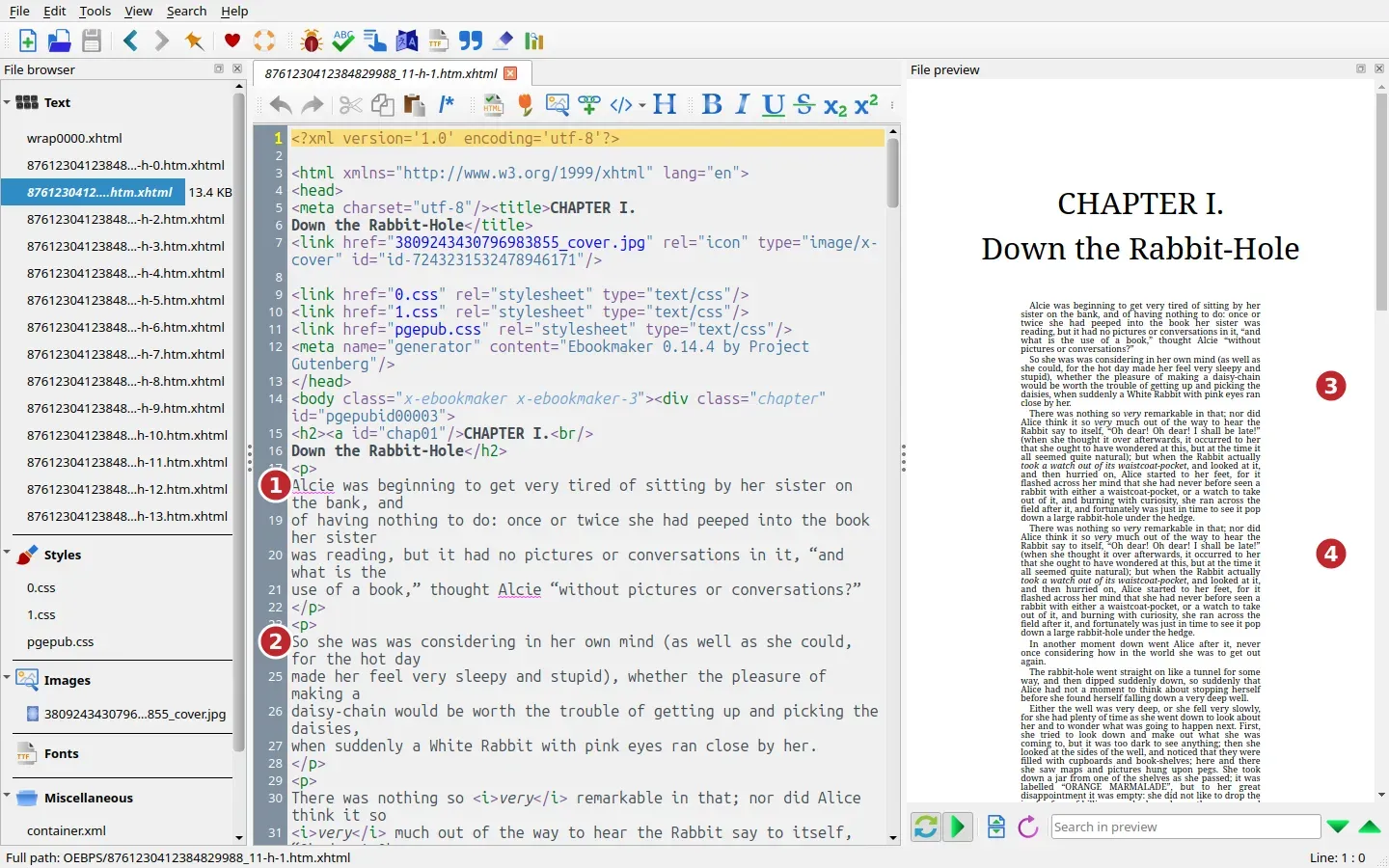
Chapter 1 before any fixes. Marker 1 is a misspelled name, 2 a doubled word, 3 text shrunk to 9 pixels by a bad stylesheet rule, 4 a paragraph that appears twice.
Below are the problems I planted and the searches that fixed them, with the hit counts in the last column.
| Problem | Find (mode) | Replace with | Hits |
|---|---|---|---|
| Misspelled name | Alcie (normal) | Alice | 2 |
| Doubled word | was was (normal) | was | 1 |
| Two spaces after a full stop | \. + (regex) | a period and one space | 19 |
| Same paragraph twice | (?s)(<p>\n(?:(?!</p>).)*</p>\n)\1 (regex) | \1 | 1 |
| No space after a sentence | ([a-z][.!?])([A-Z]) (regex) | \1 \2 | 2 |
The duplicate-paragraph pattern matches a paragraph followed by an identical copy and keeps one of them. The (?s) lets the dot cross line breaks.
I planted three missing spaces and that last pattern found two. The third sat in a <title> tag, glued to a Roman numeral (III.A), and [a-z] can't match a capital I. A separate search for III\.A caught it. Regex finds what you described, and sometimes you described the wrong thing.
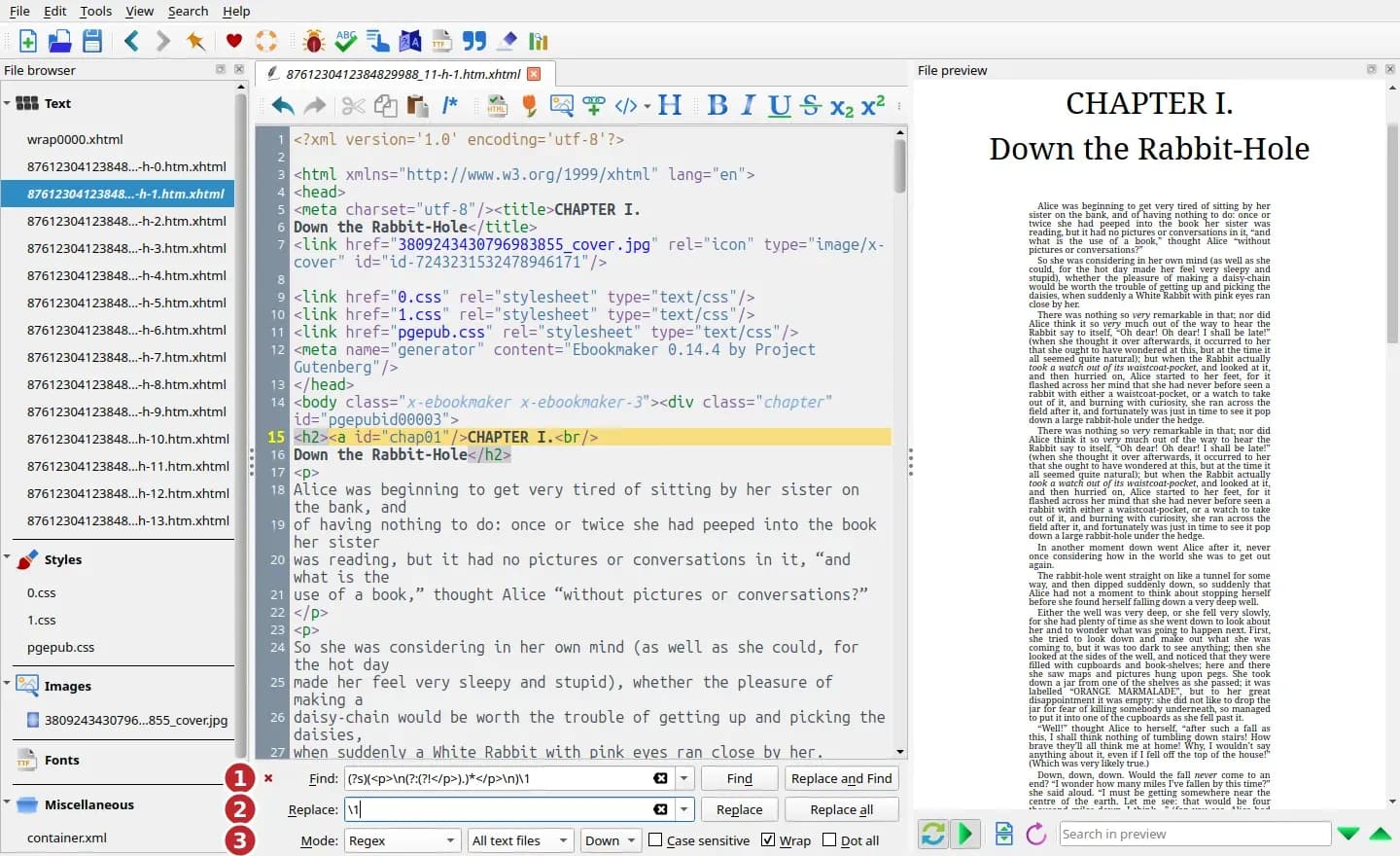
The duplicate-paragraph search, ready to run. 1 is the Find box, 2 the Replace box and 3 the mode menu. The scope menu beside it reads All text files.
Straight apostrophes mixed in with curly ones got Tools, then Smarten punctuation. It changed four files, which surprised me. The chapter I'd damaged was one. Gutenberg's header and license pages were two more, and the fourth was the cover page, whose <title> had straight quotes of its own. The See what changed button shows each edit, and I read them. It also skipped two apostrophes inside a <pre> block, which holds the letter Alice writes to her own feet, addressed to "Alice's Right Foot, Esq." I left those.
Fix formatting and CSS
Open the stylesheet from the Styles group in the file browser. In my broken copy the last rule in pgepub.css set every paragraph to 9px, a line height of 1 and 18% side margins. The live preview looked like the fine print on a pill bottle. One regex swapped that rule for font-size: 1em and line-height: 1.4, and F5 refreshed the preview.
Use relative units. A pixel font size fights the reader's own text-size setting, while em and percentages go along with it. I'd go further and say pixel sizes are almost never right in an EPUB, though that's an opinion and I could be wrong here. Chapter breaks usually come down to one line, page-break-before: always on the heading, and the Gutenberg stylesheet puts it on h2. If chapters run together, look there first.
Don't strip every style to "clean up". Reflowable books lean on CSS for justification, margins, heading breaks and image sizes. Tools, then Filter style information, removes whichever properties you pick from the whole book, so pick one at a time.
The preview pane is quick but not faithful. Its own note says page breaks and margins won't show. Final judgment belongs to a real reader.
Replace the cover
Tools, then Add cover. The dialog lists every image in the book and has an Import image button and a Preserve aspect ratio box. My bad cover was a 200-pixel-wide picture stretched to 800 by 1104. I imported the original, calibre refused it because a file with that name already sat in the book, and renaming the import to cover-800x1104.jpg got it through. Calibre then wrote a fresh titlepage.xhtml and pointed the cover entry in the OPF at the new image. It also dropped the old cover page and the old image, so the book doesn't carry both.
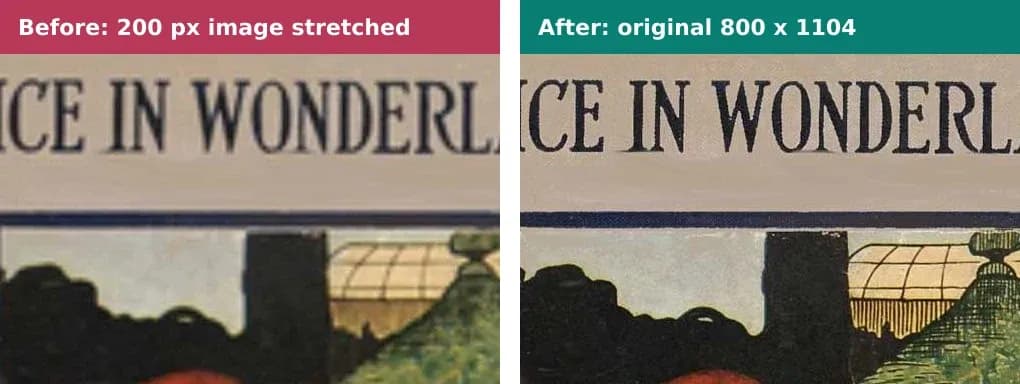
Both crops are at 100%. The soft one is the stretched 200-pixel image.
Calibre's main window can set covers too (Edit metadata), but I used the editor so the change happens inside the file. Keep the original's proportions, which here are 800 by 1104. Then open the book in two apps. I haven't, so I can't tell you which one will complain.
Repair the table of contents
Two files hold the contents. EPUB 3 books carry a navigation document (toc.xhtml here), and many also keep the older NCX file (toc.ncx) for EPUB 2 readers. The W3C's EPUB 3.3 spec makes the navigation document mandatory. Saving a table of contents in calibre writes both, and I counted 17 entries in each.
Tools, then Table of Contents, then Edit Table of Contents. My planted version listed seven entries, and chapter III pointed at the chapter IV file. Every row still wore a green tick. The tick says the target exists. It says nothing about whether the target is the right one.
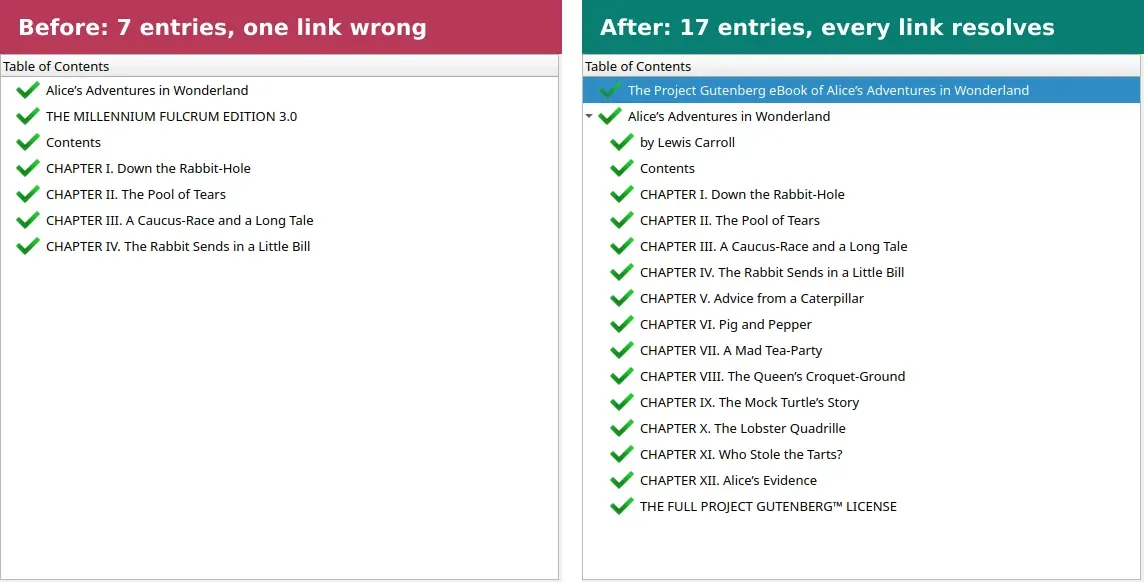
The table of contents editor before and after the rebuild.
But there's a trap. Generate ToC from major headings adds to whatever is already there, so my first attempt gave me the old seven rows plus a fresh tree underneath. I undid it, removed the old rows one at a time (select a row, click the recycle icon) and generated again. That produced 17 entries, chapters I to XII nested under the book title, and a script confirmed every navigation link landed on a real file and anchor.
You can drag entries around and double-click to rename them. Insert inline Table of Contents, from the same menu, adds a visible contents page to the book itself.
Save, check and test
Ctrl+S saves into the file. Save a copy (Ctrl+Alt+S) leaves the original alone. F7 runs Check book. Mine reported one error, a duplicate body selector in 1.css that was already in the file I downloaded, and I let it be.
EPUBCheck 5.4.0, the W3C's validator, gave the same single complaint (an aria-label on the navigation document) for the original, the broken copy and the repaired one. A validator checks structure. It can't tell that nine chapters fell out of your contents list.
So I checked what a validator can't. A short script compared the saved file with the Gutenberg original.
| Check | Result |
|---|---|
| "Alcie" left | 0 |
| "was was" left | 0 |
| Copies of the repeated paragraph | 1 |
| Double spaces after a full stop | 0 |
| Navigation links that resolve to a file and anchor | 17 of 17 |
| Cover size | 800 x 1104 |
| Prose of chapters 1 to 3 against the original | identical, ignoring quote style |
What I couldn't do is open the result in two real readers. Amazon's Send to Kindle takes EPUB (up to 200 MB by web upload), and Apple Books on a Mac imports it through File, Import or by drag and drop. My guide to opening an EPUB on Kindle covers the Kindle side.
When calibre is the wrong tool
Fixed-layout books, picture-heavy children's titles, interactive EPUBs and anything with heavy CSS or scripting want something more specialised. Sigil is free and has long handled EPUB 2 and 3. Oxygen XML Editor builds in EPUBCheck. A professional formatter earns the fee on a big catalog, or when one book needs several language editions before a free launch.
That last case is where we come in. PageTranslate translates a whole EPUB and returns an EPUB with chapters and table of contents kept. It doesn't edit or reformat your book and has no side-by-side output. DRM-protected files are off limits. Fix the source first, because typos get translated along with everything else, then spot-check the contents list and the dialogue in the translated file. The output is a machine draft, so plan a post-editing pass before you publish it. The Kindle translation guide walks through that route, and the cost FAQ explains how the price is worked out from your word count. For longer projects there is also the book translation page.