Difference Between Machine Translation and CAT Tools: A Real Test
By PageTranslate Team · · 5 min read
The difference between machine translation and CAT tools is who writes the translation. Machine translation writes it for you. A CAT tool helps a human translator write it, and then remembers every sentence for the next job.
To see what that means on a real file, I put the same short manual through OmegaT, a free CAT tool, and through PageTranslate on October 2. With an empty memory, OmegaT translated nothing at all. That is by design, and it explains when each tool earns its keep.
PDF, Word or EPUB, same format back. Exact price before you pay.
What machine translation does
Machine translation (MT) is software that produces a translation by itself. Google Translate, DeepL and the large language models behind PageTranslate all work this way. You give it text or a file and get target-language text back in seconds, with no human in the loop unless you add one.
Its strength is speed and price. Its weakness is that nobody checked it. The post-editing guide covers how to fix a draft, and machine vs human translation covers when a draft is enough.
What a CAT tool does
A CAT (computer-assisted translation) tool is a workbench for a human translator. The European Commission's 2017 translation tender defines it as software that supports the translation process, "e.g. translation memory tools and terminology databases". Its main parts are these.
- Segmentation. The text is split into sentences or similar units, each shown beside an empty target field.
- Translation memory (TM). Every finished segment is stored with its source, so the same sentence never has to be translated twice.
- Matches. When a new segment resembles a stored one, the tool offers it with a score. memoQ, for example, calls 100% an exact match, 101% an exact match in the same context, and 50 to 94% a fuzzy match.
- A termbase (glossary) that flags agreed terminology.
- QA checks for numbers, tags and missing translations, plus file filters that keep the formatting of Word, InDesign or XML files.
- In team tools, shared memories, review steps and version history.
Most CAT tools can also call a machine translation engine. memoQ's documentation says it "does not perform machine translation itself" but connects to many external engines, and Trados Studio's pre-translation can draw on memories, termbases and MT. So the two technologies meet constantly. They are just different jobs.
Machine translation vs CAT tools, side by side
| Machine translation | CAT tool | |
|---|---|---|
| Who writes the translation | The software | A human translator |
| Translates on its own | Yes | Only from its memory, or a connected MT engine |
| Remembers past work | No | Yes, in the translation memory |
| Terminology | Whatever the engine chooses | A termbase the translator maintains |
| Typical user | Anyone | Professional translators and agencies |
| Cost | Free to a few cents a word | Free (OmegaT, Matecat) to paid licences, plus the translator's time |
| Best for | Drafts, gisting, high volume | Repeated or updated content, consistency, regulated text |
A real comparison on one file
The test file was an invented two-page kettle manual in Word, English to Spanish. Version 1 has headings, a numbered list, a bold "Warning:" three times, a short table, a header and a footer. Version 2 is the same manual a few months later, with two paragraphs rewritten and two added, which is how real manuals change.
PageTranslate took version 1 in a browser upload and returned a Spanish DOCX in about 14 seconds, with paragraphs, list styles and bold kept. The table cells, header and footer stayed in English, as the DOCX translator page warns. Version 2 was retranslated from scratch, and all 219 words were quoted again.
Here is the part that surprised me. Of the 12 paragraphs that were identical in both versions, 2 came back worded differently the second time. "The kettle turns itself off when the water boils" was se apaga solo in version 1 and se apaga automáticamente in version 2. Both are correct. A reader comparing the two manuals would still wonder why they changed..
OmegaT 6.1.1 (free, GPL licensed, needs Java 11 or later) is a 398 MB download. I set up project folder by hand and ran its console statistics and translate modes.
- Empty memory, version 1. OmegaT found 33 segments and 211 words (it counts the table, header and footer too), and translated none of them. The output DOCX had the same text as the source.
- Version 2, with version 1's translations as a memory. I aligned the source with PageTranslate's Spanish using a short script and placed the file in OmegaT's
tm/autofolder. OmegaT filled 18 of 39 segments automatically and left 21 (110 of 244 words) for a person. The rewritten and new sentences stayed in English, and so did the three bold warnings. I think the bold tag inside "Warning:" kept that sentence from matching the plain-text memory exactly.
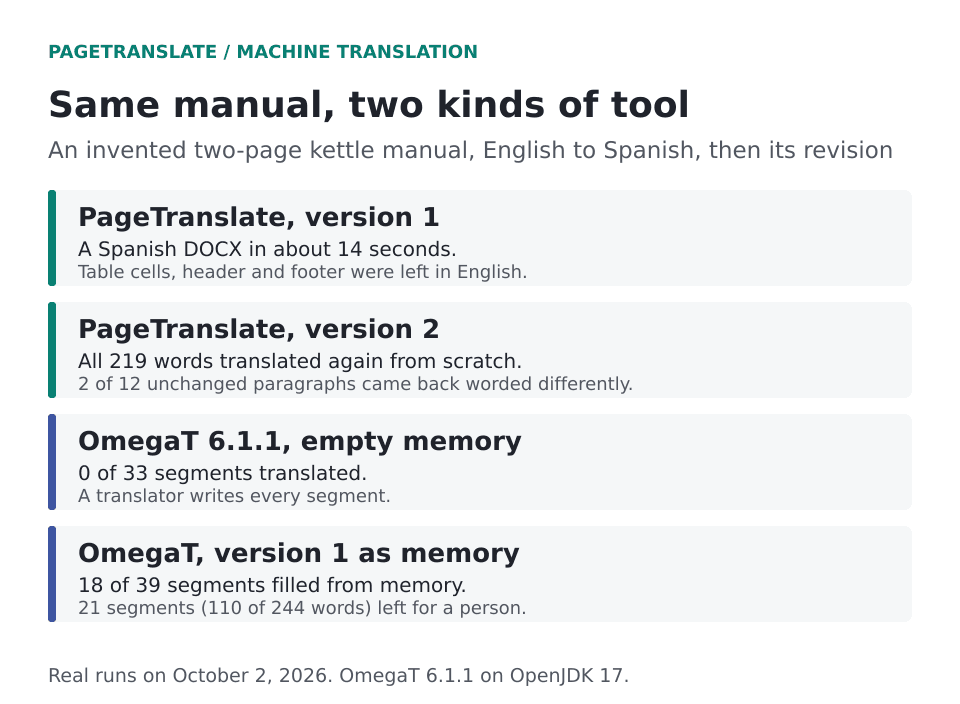
Real runs on October 2. OmegaT 6.1.1 on OpenJDK 17, and PageTranslate's own pipeline run locally.
So the two tools answer different questions. PageTranslate answers "what does this say in Spanish?" quickly. OmegaT answers "what did we already approve, and what is new?", which is the question a translator asks on version 2, 3 and 30 of anything.
Where PageTranslate fits
PageTranslate is machine translation for whole files. It is not a CAT tool. There is no translation memory, no termbase or glossary upload, no review workflow and no shared projects, so it won't keep last year's wording unless the model happens to choose it again.
It fits the one-off document or the draft you want to read today. A book that a translator will later revise in their own tools is fine too. For the technical documents that come back every quarter, a translator with a CAT tool will give you consistency we can't. If you only need a first pass, start with the document translator and see the cost FAQ.
Translation memory and price
Agencies often discount repeated text. The European Commission's 2017 tender paid 20 percent of the full price for pages of 100% matches, 50 percent for 85 to 99% matches, and the full price for anything lower or new. That is one buyer's scheme from 2017, and others set their own, but it shows the logic. When you compare offers, ask for the match breakdown, as how to compare translation quotes explains.
When to use each
- Machine translation alone for gisting and drafts nobody will publish.
- MT plus a human editor (MTPE) when the text matters and the budget doesn't stretch to full translation. See translation quality for how to judge the result.
- A translator in a CAT tool for manuals, software, websites and anything updated over time, or where terminology has to stay fixed.
- PageTranslate when you need the whole file back in the same format today, and you'll read it or have it reviewed yourself.
The purpose of translation decides more than the tool does. Match the method to what the reader will do with the text.