Google Translate Is Bad at Books. Here's What Breaks and What to Use Instead
By PageTranslate Team · · 6 min read
Google Translate is bad at one job in particular, and it's usually the job people try last. A whole book.
Quick answer. Google Translate is fine for a sentence or an email. For a book it breaks down. It won't take EPUB files, it caps documents at 10 MB and 300 PDF pages, it leaves scanned pages untranslated, and each upload forgets the names it used in the last one. Use a tool that translates the whole book file and returns the same format, then have a bilingual person review it.
This page is for authors and small publishers (and plenty of readers) who already tried it and got a mess back. If you want quick translations of short text, Google's still a reasonable free option (I use it for restaurant signs like everyone else).
EPUB in, EPUB out, PDF and DOCX too · Exact price before you pay · 3,000 free starter words
Why Google Translate falls apart on a book
Most of these limits are in Google's own help pages. People just don't read them until an upload fails.
No EPUB. The web document translator accepts .docx, .pdf, .pptx and .xlsx. That's it. Most ebooks are EPUB, so step one becomes converting your book into something else, which already costs you the structure.
10 MB and 300 pages. Google caps documents at 10 MB, and PDFs must be 300 pages or fewer. A 400-page novel with a cover image and a few maps needs to be chopped into pieces.
Scanned pages are the sneaky one. Google says text in images and scanned PDF pages is found in the output "but they aren't translated." So an old paperback you scanned comes back in the original language, silently, next to translated pages.
It also doesn't work on phones.. Document translation "isn't available on smaller screens or mobile," per the same help page.
And every upload is a fresh start. Split your book into four files and Google has no idea that "Mrs. Oakes" in part one is the same person in part three. You'll get different spellings of names, different words for the same invented thing, sometimes a different level of formality in dialogue.
What it does to the formatting
Here's the part that eats weekends. Google's own developer docs for the Cloud Translation API describe a "shadow text" problem, where translated text overlaps the original in some PDFs because the layout can't fit the new wording. Hyperlinks and font styling only survive for native PDFs, and scanned sections of mixed PDFs aren't translated at all.
In practice, with a book you'll usually see a mix of these.
- A table of contents whose links go nowhere after conversion.
- Italics dropped. For fiction that hurts, since italics often mark thoughts or foreign words.
- Chapter headings demoted to plain paragraphs.
- Text overflow in PDFs. Translations into German or French often run longer than the English, and a tight page layout has nowhere to put the extra words.
- Footnotes turned into floating numbers.
I could be wrong here, but I think the reformatting is what actually makes people give up. Translation quality is debatable. Spending a weekend retyping 40 chapter headings is not.
How accurate is it, really
Accuracy varies wildly by language, and the best data is from medicine, where somebody had a reason to measure.
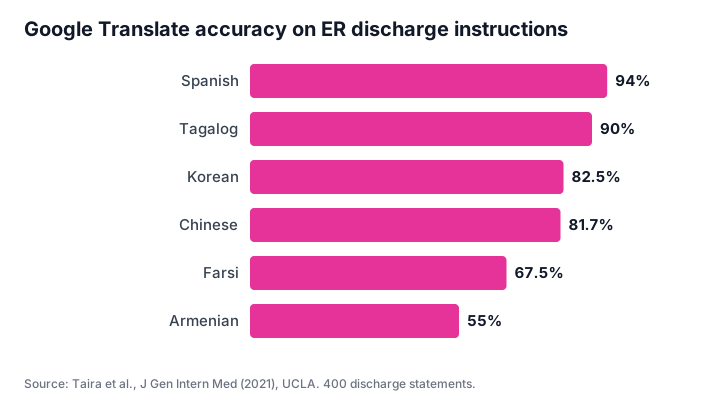
A 2021 UCLA study ran 400 emergency-room discharge statements through Google Translate. Spanish came out 94% accurate. Armenian came out 55%. One error turned the blood thinner Coumadin into "soybean," which is the kind of mistake that's funny until it isn't. The authors' verdict was that Google Translate was "not ready for prime time use in the emergency department."
An earlier 2019 UCSF study in JAMA Internal Medicine found 92% accuracy for Spanish and 81% for Chinese. The share of sentences with potential for significant harm was 2% in Spanish and 8% in Chinese.
Fiction isn't a hospital. But the pattern carries over. If your book is going into Spanish or French, raw output is readable. Into a language with less training data, expect a lot more fixing.
What changed with Gemini (and what didn't)
Google moved some of Translate onto Gemini in late 2025. The December 2025 announcement covered text translation between English and nearly 20 languages, starting in the US and India. Tech press also reported a Fast/Advanced model picker, where Advanced works for text only, in select languages.
Nothing in Google's help documentation changed the document limits. Still no EPUB, still 10 MB.
LLM-based translation brought a new weird bug too. In February 2026 The Decoder showed that the Gemini-based Translate could be tricked into answering instructions hidden in the text instead of translating them. Rare in a novel, sure. Still, an odd thing to find in your translation tool.
What good book translation looks like
Before picking a tool, know what you're grading it on.
- One upload, one book. The whole file goes in at once, so names and terms stay consistent.
- Same format back. EPUB in, EPUB out, with the table of contents working.
- Italics and headings survive. Footnotes stay attached to their numbers
- Scans handled. Or at least an honest warning when a scan can't be read.
- You see the price before you commit, and you can test a chapter first.
Point five sounds minor. It's how you avoid paying for 90,000 words of something you hate by page three.
Better options than Google Translate for books
| Option | EPUB | Scanned pages | Keeps book formatting | Cost | Best for |
|---|---|---|---|---|---|
| Google Translate (web) | No | Not translated | Partly (DOCX/PDF only) | Free | Short text, single short docs |
| DeepL | No EPUB | Yes | Partly | Free plan 1 file/month; paid from $8.74/mo | Business documents in supported languages |
| ChatGPT or Claude | Claude can read EPUB | Varies | No, you get chat text back | Free/paid | A few pages, explanations |
| AI book translator (e.g. PageTranslate) | Yes | Latin-script scans | Yes, same format returned | Per word, quoted upfront | Whole books and long documents |
| Human translator or agency | Yes | Yes | Yes | ~$0.13/word average for literary work | Debuts, literary fiction, anything certified |
Prices and limits checked September 27, 2026. DeepL figures from deepl.com/pro and DeepL's document API list.
Chat tools deserve a note. Pasting a novel into ChatGPT a chapter at a time technically works, and people do it. But you lose the formatting and you have to rebuild the book yourself. Consistency depends on whether the conversation still "remembers" chapter one. I tried keeping a style note pinned at the top of each prompt once, and by chapter eleven I was spending more time copy-pasting than reading.
PageTranslate is our tool, so weigh my opinion accordingly. It takes the whole book file and keeps the chapters and nested table of contents in EPUBs, then hands back the same format. Footnotes get translated too. Scanned pages are read with OCR when the source is one of six Latin-script languages (English and Spanish among them). Asian and Arabic scripts in scans aren't read reliably yet, and we say so on the upload page. There's no glossary upload yet either.
For a full comparison, see our DeepL alternatives guide.
A workflow for translating a whole book without losing formatting
- Start from the cleanest file you have. An EPUB from your formatter beats a PDF export. A PDF export beats a scan.
- Use your own source file. Store-bought ebooks with copy protection get rejected, by us and by most tools.
- Upload the whole book once to an EPUB translator or PDF translator.
- Read chapter one against the original. Fix names in a list.
- Send the file to your reader app or Kindle and page through it on the actual device (how to open EPUB on Kindle).
- Get a bilingual reader to post-edit, starting with dialogue. Our MTPE guide has the full process.
No copy-pasting chapters. No rebuilding a table of contents at 1 a.m. with cold coffee.
Related reading
- Machine translation vs human translation
- Machine translation post editing (MTPE)
- How to translate a Word document
- Translate a large PDF
See whether the formatting survives before you pay for the rest.