Translating Technical Documents
By PageTranslate Team · · 9 min read
Preparation of source files, agreement on terminology and checking of translated texts against various formats (printed products, online help, etc.) – this is how technical translation is done. Special rules apply to manuals, safety instructions and products subject to monitoring within certain industries, i.e. those that are subject to certain regulations. These documents require the involvement of a second, bilingual specialist and, possibly, approval by certain individuals.
When translating documents containing more than text (e.g. tables, diagrams, on-device commands and numbers indicating changes), it is essential that these elements are translated correctly and in line with the original document. The examples below show a brief, a glossary and a page from our own workflow for translating documents.
High-risk content needs qualified review.
Choose a workflow for the document's intended use
| Document | Main failure to prevent | Appropriate review |
|---|---|---|
| Internal background report | Misunderstood argument or missing section | Bilingual reader familiar with the subject |
| Installation or maintenance manual | Incorrect step, component or warning | Bilingual technical specialist; test procedures where appropriate |
| Product specification or engineering drawing | Changed units, tolerances or identifiers | Engineering review of all critical values and labels |
| Safety data or emergency procedure | Incorrect hazard or response | Qualified safety and jurisdiction-specific compliance review |
| Medical-device, legal or regulatory submission | Incorrect instructions or noncompliant documentation | The relevant qualified professionals and required formal process |
| Recurring documentation across many locales | Diverging terminology and outdated revisions | CAT/TMS workflow with termbases, translation memory and managed review |
In most cases, the level of review needed for a reading copy is very different from the level of review needed for documents to be distributed to end users, such as installers or maintenance personnel. For submittals subject to particular regulations, it is wise to have the appropriate specialist(s) responsible for the submittal verify the translation process as well as confirm that all required processes were followed.
This reviewer can serve as a contact point within the team for terminal matters related to the document, such as unclear terminology or other technical questions or comments, long after the translation work has been done.
The workflow used by ASME Standards-Translation Committees is similar: they are composed of members with in-depth knowledge of the ASME standards and of the languages in which the standards are to be translated.
Freeze the source and gather the full document set
We prefer a translate the editable original (e.g. DOCX file from MS Word, original Illustrator files, etc.) rather than a PDF or even scanned version of the document.
The translator or service will need:
- The exact revision to translate, with a date and version identifier.
- The target locale and the intended audience (e.g. technicians as opposed to end customers).
- Referenced diagrams, source artwork and screenshots.
- Approved product terminology and previous accepted translations.
- Source strings that should not be translated and must remain identical, such as part numbers, commands, variable names and URLs.
- Deliverables (e.g., CSV files, editable InDesign files) and key contacts for further inquiries.
First make a note of any inconsistent naming in the original language. For example, one component could be called a “controller”, “control unit” or “module” and you should check whether these refer to one component or to three different components. This decision is then to be carried through in the translation.
For scanned content, be sure to review the page order of the recognized text as well as numbers and special characters, such as % &. If the original pages were faint or poor quality then indicate potential for error on the translated pages.
Copy this technical translation brief
| Brief field | Example instruction |
|---|---|
| Project | Installation guide, source revision 3.2, released September 2026 |
| Target locale | Spanish for Mexico; intended for trained installation technicians |
| Scope | Translate body text, warnings, table headings, captions and editable figure labels |
| Protected content | Keep model PX-240, command RESET_ALL, pin identifiers and URL paths unchanged |
| UI policy | Match the actual localized interface; retain English labels where the device displays English |
| Units | Preserve source values and units; flag proposed conversions for engineering approval |
| Terminology | Follow approved term list; ask about missing terms rather than inventing synonyms |
| Deliverables | Editable target file, issue log, final rendered PDF and revision record |
| Approval | Bilingual reviewer plus responsible engineer for critical procedures |
This example is fictional. Please use it to create a real Project Brief for your specific installation guide.
For embedded text in figures (drawings, photos, etc.), it would be good to assign someone (possibly same person who translated surrounding text) to work up embedded text for artwork. Otherwise, you will risk delivering an incomplete “installation guide” and incurring later charges for completion that you had anticipated would not be required.
Build a small glossary before translating
When localizing a big amount of content is needed, it is a good practice to first build a glossary to be used for translations. A good starting point is to list all repeated components, special verbs, and terms that could have more than one meaning. Each approved translation term should have a definition or at least some context where it was used.
| Source term | Approved target | Context | Restriction |
|---|---|---|---|
| controller | controlador | Electronic control component | Do not alternate with a term meaning operator |
| torque | par de apriete | Fastener tightening instruction | Confirm local engineering convention |
| reset | restablecer | Prose describing a procedure | Keep a literal on-device RESET label when applicable |
PX-240 | PX-240 | Model identifier | Never translate or change the hyphen |
The terms above are examples only and would need to be confirmed by the language specialist on the project with the source terms and with the local engineering team to ensure that the approved terms are used consistently.
This list may also include allowed abbreviations and even a note on alternatives that should be avoided. It is also wise to record why a change to terminology was made.
PageTranslate does not have file upload of a glossary, no translation memory, and no shared workspace for review of a translated file. Therefore, it is recommended that a glossary is kept with the file translated and that the file is reviewed with that glossary. Larger projects that are translated on a regular basis might want to look into computer-assisted translation software or a Translation Management System (TMS).
Translate a sample, then review the full draft
First, translate a small sample (e.g. warning, a table, a diagram and the body of a long procedure). This allows the reviewer to get a sense of the scope of the work and establish a file format and terminology convention early on.
The original source documents and translated documents should be kept together for review purposes. An issue log should be used to list page/section numbers, original words, proposed words, who will make the final decision, and the final decision.
Review the draft in this order:
- Completeness: All sections, notes, warnings and captions are present.
- Critical meaning: actions, conditions, prohibitions and relationships are correct.
- Protected content: identifiers, commands, links and units follow the brief.
- Terminology: approved terms are applied consistently.
- Readability: sentences are direct enough for the intended reader.
- Final layout: The re-written text still fits in the correct place in relation to the rest of the content on the page.
Our post-editing guide provides more details about the review process. As already mentioned, checking the meaning before changing the style is important for keeping the technical content consistent.
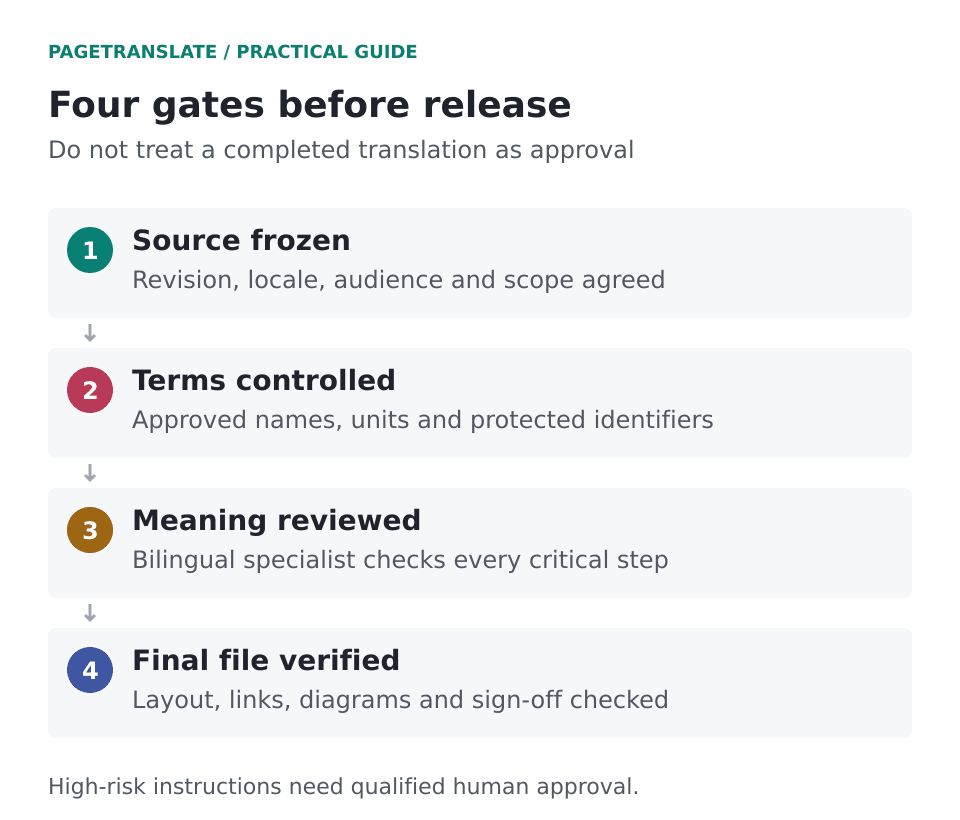
Preparation, terminology, specialist review and final-file inspection are separate stages of the release process.
Numbers, negation and symbols deserve their own pass
Numbers and symbols are distinct from text content and often deserve their own pass through the inspection process. While decimal punctuation (1.5 vs. 1,5) may change between locales, the numerical value and the rest of the associated instruction should remain stable.
| Risk | Example to inspect | Acceptance question |
|---|---|---|
| Negation lost | "Do not restart while the cover is open" | Is the prohibited action still prohibited? |
| Condition changed | "Only after pressure reaches zero" | Is the same prerequisite required? |
| Decimal changed | 1.5 versus 1,5 | Does the target convention preserve the numerical value? |
| Unit confused | m versus mm; N versus N·m | Is the same quantity and unit specified? |
| OCR confusion | O/0, l/1, missing minus sign | Does recognized text match the source image? |
| Identifier altered | AB-104, firmware 2.10 | Is the exact identifier retained? |
| Cross-reference wrong | "See Figure 7" after rearrangement | Does it point to the correct diagram? |
| Code localized | Command, placeholder or configuration key | Can the literal still be used by the system? |
The listed examples only demonstrate how you could check for errors. It is your responsibility to include checks for all values and identifiers used in your document.
Unit conversions and apparent errors are best resolved with the document owner. Note all changes and apply them to prose, tables and diagrams simultaneously.
Inspect the rendered document, not just extracted text
For a fully interactive manual that will be read on a screen, a final review of the rendered document is required, identical to the source. For printed copies of a manual, this review should also be done on a printed copy of the critical pages.
- Check that rows and columns maintain their relationship with the correct values.
- Check long headings translated to a long script language are not spanning to cover adjacent content.
- Check diagram labels remain inside their intended boxes.
- Look for the script in all fonts, including special characters and superscripts.
- Check figure numbers, internal links, bookmarks and external links.
- Headers, Footers, Text within Images, and Rotated (Sidebar) Text.
Note that a full accessibility audit also is likely to require further testing than is included in a review of a page. Accessibility checks cover reading order, selectable text where it is expected, alternative text for images and figures, and correct use of headings to create a hierarchy of information.
A concrete lesson from our NIST example
This means we have made a page of our product showcase, showing the translation into Khmer of the body text and the compact diagram of NIST AI 100-1 as it was published in September 2026. This page gives us an example of how the translated labels fit into the original layout of the page.
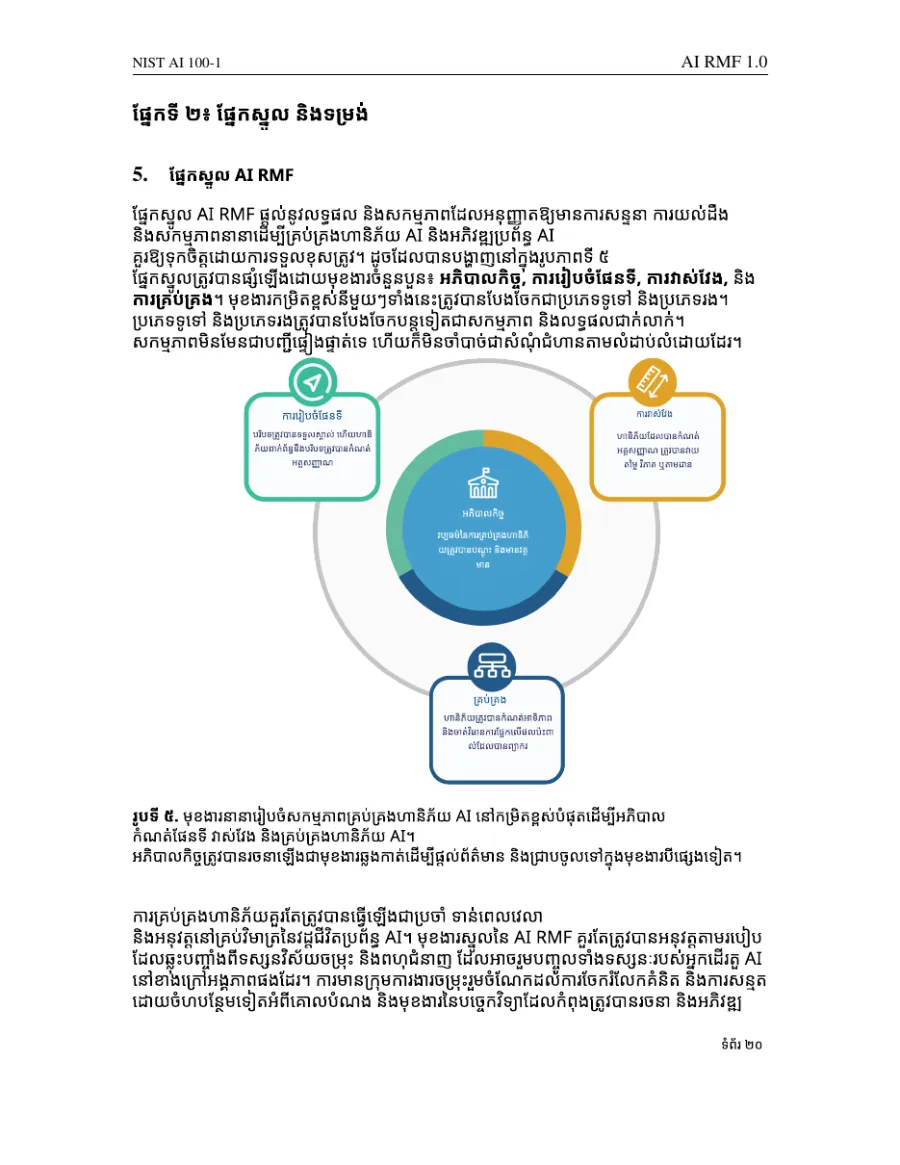
Unedited output from September 2026. We keep the source handy as it was a US government publication. Note how some of the long Khmer labels wrap between syllables within the narrow boxes of the diagram.
The narrow boxes were an interesting detail to identify for potential layout changes; the diagram itself would remain unchanged, only its lengthy labels would need to be widened to fit within the new boundaries.
That same specimen PDF is available on the PDF translation page for a single document and language combination, rather than showing results for all scripts and layouts.
Budget for review and define a release decision
In comparing prices between possible translations suppliers, one should not only consider the price per word and the languages needed, but also the scope of the offer (i.e. OCR service, diagram redrawing, specialist review, number of revision rounds, file format for delivery, etc.).
Use the same process to agree repeat work, which should also refer to how updates will be tracked and previous translations reused. If you are translating confidential manuals then check how the vendor’s access, retention and security terms are described on the security page and in the privacy policy of PageTranslate. Approval of an organizational vendor for such documents is a separate matter.
The release record should confirm that:
- Source revision and target locale are recorded.
- All critical instructions and values have an identified qualified reviewer.
- Blocking terminology, meaning and layout issues are resolved.
- The final reviewed files and references are opened in the correct environment.
- Storing the agreed and released version.
For the occasional reading draft (less than 1000 words), it’s perfectly fine to receive the translated document back in PDF or editable DOCX format. For operational / safety-critical use however, it is the owner of that content who will release the reviewed file after they have approved it against their agreed process and stored the approved version safely.
Make sure the source document, the glossary and all the approval processes are kept together with the translated file.