How to Translate Scanned PDF
Get your scanned PDF back in another language, page for page, without retyping a single line.
Drop your scanned PDF
Up to 100 MB. See the exact price before you pay.
Drop your file here
or click to browse your computer
No account needed for a quote.
Short answer
A scanned PDF is a picture of text. No translator can read it until OCR (text recognition) turns that picture into words, which is why Google Translate leaves scanned pages untranslated. Upload the scan here and OCR and translation run in one job. You download a translated PDF with the same pages. Is your scan under 2 MB? Google Docs can do it free (steps below).
- Per file, PDFs up to 1,000 pages
- 100 MB
- Price shown before payment
- Exact
- Free words with a verified account
- 3,000
- Re-run or refund on eligible jobs
- 7 days
The problem
Why your scanned PDF won't translate
A scanner saves a photo of each page. A photo has no letters a translator can read, so you hit one of these walls:
- You run it through Google Translate and the scanned pages come back in the original language.
- You try to copy a sentence, and nothing highlights.
- You start retyping it by hand. Then you count the pages.
What retyping costs you
A 200-page scanned bookabout 60,000 words
Three full workdays before you translate a single word.
Estimate: 300 words a page, typed at 40 words a minute. Price is today's guest rate with layout preservation and the per-document fee included.
The tutorial
How to translate a scanned PDF in 3 steps
Your part takes a few minutes. OCR and translation happen after you upload.
- 1
Upload the scanned PDF
Drag the file into the upload box. Book scans, office scans and PDFs that mix scanned and digital pages all work, up to 100 MB and 1,000 pages. Only have paper? Scan it into a PDF first.
- 2
Check the price and pick a language
OCR reads every page and counts the words. You see the exact price, choose from 70 languages and pay once. No account or subscription needed.
- 3
Download the translated PDF
The translation goes back onto the same pages, so paragraphs, headings and page numbers stay where they were. You get an email when it's ready.
Real files, real output
See a real scan before and after
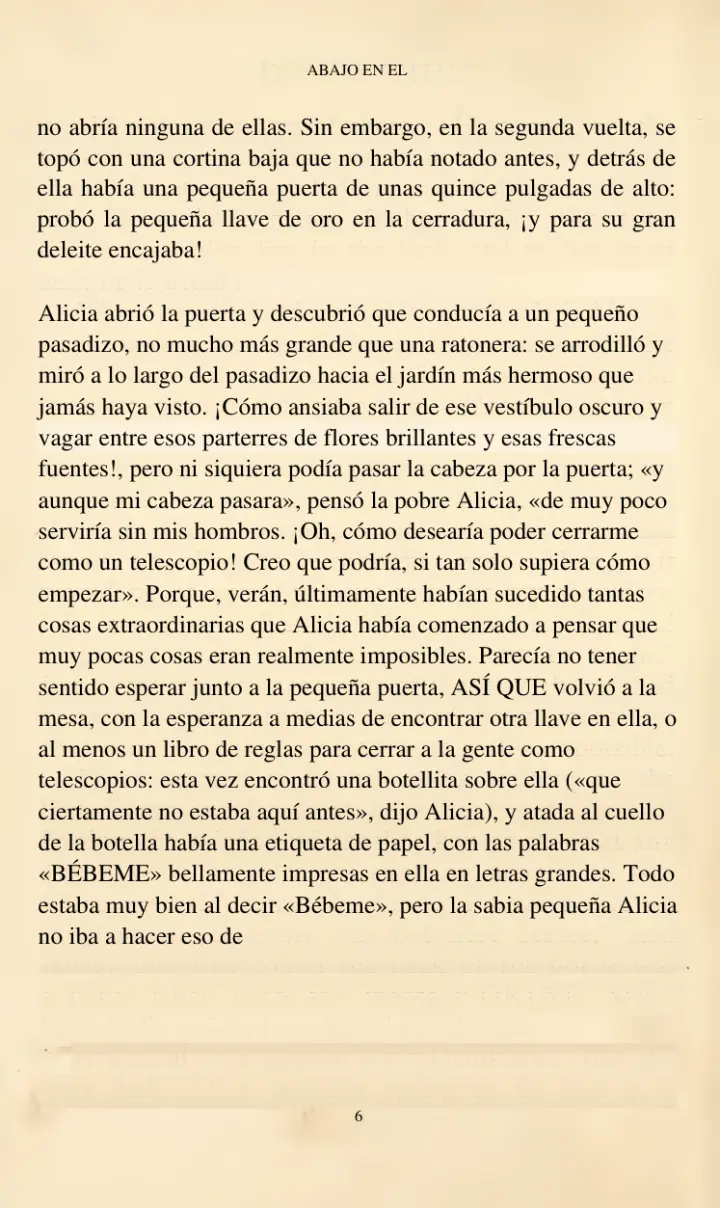
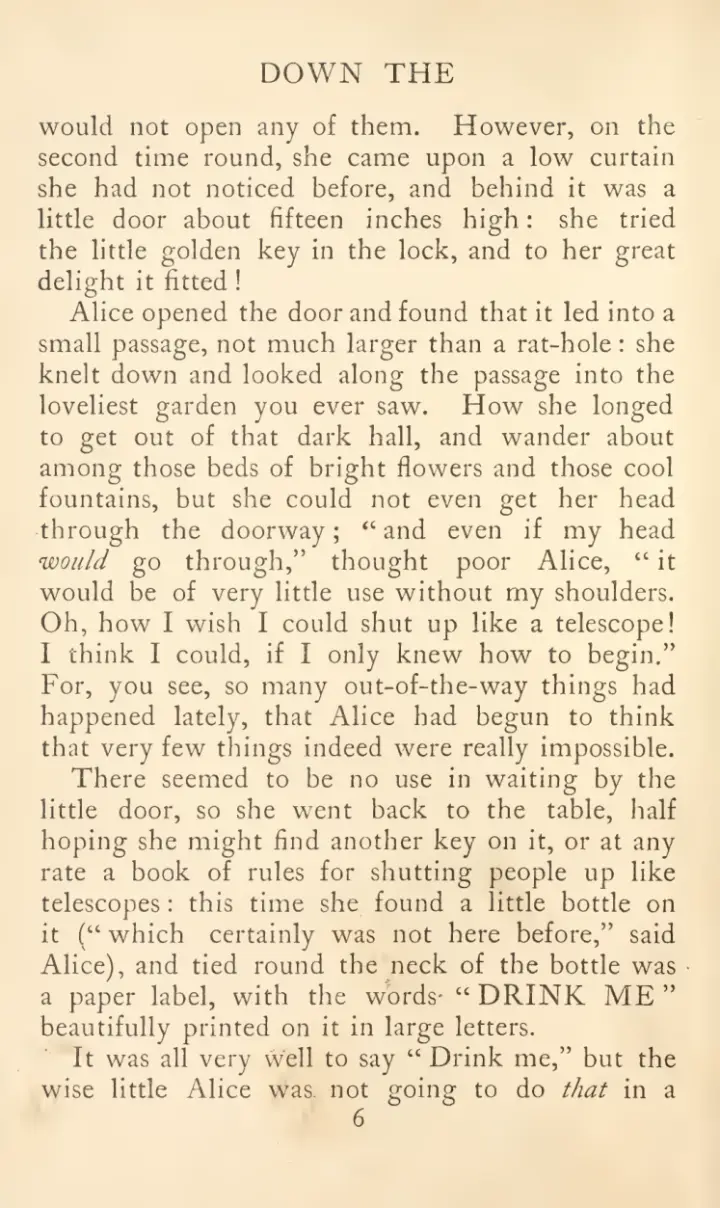
A yellowed page from a 1907 edition of Alice's Adventures in Wonderland, translated to Spanish. Nobody touched the output. Drag the handle to compare.
A 1907 scan of Alice's Adventures in Wonderland
- The yellowed page was read with OCR, then translated
- Paragraphs, the running head and the page number stay in place
- Dialogue uses Spanish «comillas» and ¡inverted marks!
Public-domain scan (archive.org), pages 25–27 of 344. Unedited output from our document-quality run. A faint trace of the source text can remain on aged scans.
The free way
Translate a small scan free with Google Docs
If your scan is short, under 2 MB, and you only need to read the text, Google's free tools can handle it.
- 1Upload the scanned PDF to Google Drive.
- 2Right-click it and choose Open with > Google Docs. Drive runs OCR and makes an editable copy.
- 3In that copy, choose Tools > Translate document, pick a language and click Translate.
- 4Read the translated copy that Google Docs opens.
Limits from Google's help pages: lists, tables, columns and footnotes are not likely to be detected, and you end up with a text document instead of your original pages.
Only need to search the scan in its own language? You don't need a translation for that. Make the PDF searchable instead.
| Compare | Google Docs | PageTranslate |
|---|---|---|
| File size | 2 MB or smaller | Up to 100 MB |
| Long scans | Split into small files first | One upload, up to 1,000 pages |
| What you get | A Google Doc with the text | A translated PDF with the same pages |
| Tables and columns | Not likely to be detected | Kept on the page; dense ones can shift |
| Cost | Free | Per word, exact price before you pay |
Before you upload
Scanned PDF translation questions
Which languages can my scan be in?
Scans written in English, French, German, Italian, Portuguese or Spanish are read reliably. Scans in other scripts, such as Chinese, Japanese or Arabic, are not, so upload a PDF with selectable text for those. You can translate into any of 70 languages.
Can I translate a scanned PDF to English?
Yes, if the scan is in French, German, Italian, Portuguese or Spanish. Upload it, choose English, and you download an English PDF with the same pages.
Will the translated PDF look like my scan?
The translation is placed on the same pages, so paragraphs, headings and page numbers stay in place. On old, yellowed scans a faint trace of the original text can show behind the new text. Dense tables and magazine-style columns can shift.
What about handwriting or blurry phone photos?
Clear, straight, printed pages work best. Handwriting, low-resolution pages and crooked photos are not a reliable fit. Check the result before you rely on it.
How much does it cost to translate a scanned PDF?
You pay per 1,000 words of text found in the scan. The exact price appears after upload, before you pay. A verified free account includes 3,000 words, enough to test a chapter.
What if the translation comes out wrong?
Jobs of 50,000 words or less come with a 7-day re-run or refund guarantee. Larger jobs are eligible for re-runs or credits.
Is my scanned document private?
Uploads are encrypted in transit and at rest, and access is restricted. You keep ownership of your file and the translation.
Is this a certified translation?
No. It is an AI translation for reading and review. Court, immigration and government papers usually need a certified human translator.
Your scan, translated, without retyping a page
Upload it, see the exact price, and download a translated PDF with the same pages.
Upload your scanned PDFJobs of 50,000 words or less come with a 7-day re-run or refund guarantee.
Related pages
- PDF TranslatorTranslate digital, scanned or mixed PDFs and download a PDF that keeps its page layout.
- Translate a BookUpload a whole PDF, EPUB or DOCX book and get the translated file back in the same format.
- How to Translate Word DocumentThree ways to translate a Word file, and when each one keeps your formatting.